
- ◆Writing from a blank screen takes longer than it should. Every time.
- ◆AI removes the blank screen part. Give it the property type, key features, target buyer, tone, and word count. It produces a working draft in under a minute. You edit, check, and send.
- ◆This guide covers what to give it, which tool works best for descriptions, three ready-to-use briefs, and what to check before anything goes on a portal.

You have written this description before. Different address. Same house.
Three-bed semi. Nice kitchen. South-facing garden. Close to schools. You type “well-presented” and immediately resent yourself for it. Delete it. Stare at the screen. Type it again.
AI does not write the description for you. What it does is give you something to work with in under a minute, so you are editing rather than starting from nothing. That is where most of the time goes.
Why Property Descriptions Are a Good AI Task
The information is already in your head. You have been round the property. You have the notes, the photos, the key selling points.
The problem is converting all of that into structured, readable copy that does not sound like every other listing on Rightmove or Zoopla. That is a formatting and writing task, and AI handles those well.
Give it the information clearly and it produces a working draft fast. You edit what is off. You add the local detail. You make sure it sounds like your branch rather than everyone else’s.
The brief is what determines how much editing you do afterwards. That is what this guide is about.
Why AI descriptions sometimes sound generic
Generic output comes from a generic brief. AI cannot invent features you did not mention or a target buyer you did not describe. “Three-bed house” produces three-bed house output. “Three-bed mid-terrace, south-facing garden, newly fitted kitchen, target buyer a young family moving out of a flat” produces something worth editing. The prompt writing guide covers the full prompting formula.
What to Give It (The Brief)
Five things. You do not need all five every time, but the more you include, the less you edit after.
The property type and key features. Not “three-bed house.” The features worth leading with. Refurbished kitchen, off-street parking, converted loft, period details. What makes this one different from the three others you listed this week.
The target buyer. Young family, first-time buyer, downsizer, investor. It changes the tone and the emphasis, and AI responds to specific direction here.
The tone. Warm and welcoming. Understated. Aspirational. You know your market. Tell it.
The word count. 150 words, 200 words, whatever the portal or your template needs. Without a number, AI picks its own length and is usually off.
Clichés to avoid. No “stunning.” No “must be seen to be believed.” No “beautifully presented.” List the phrases you always edit out and they are less likely to appear.
Facts you must never delegate to AI. Lease terms, service charges, EPC ratings, flood-risk status, school catchment. AI has no access to your title register, your EPC, or the vendor’s instructions. If a fact needs to be accurate, you are the source. Not the tool. More on this below.
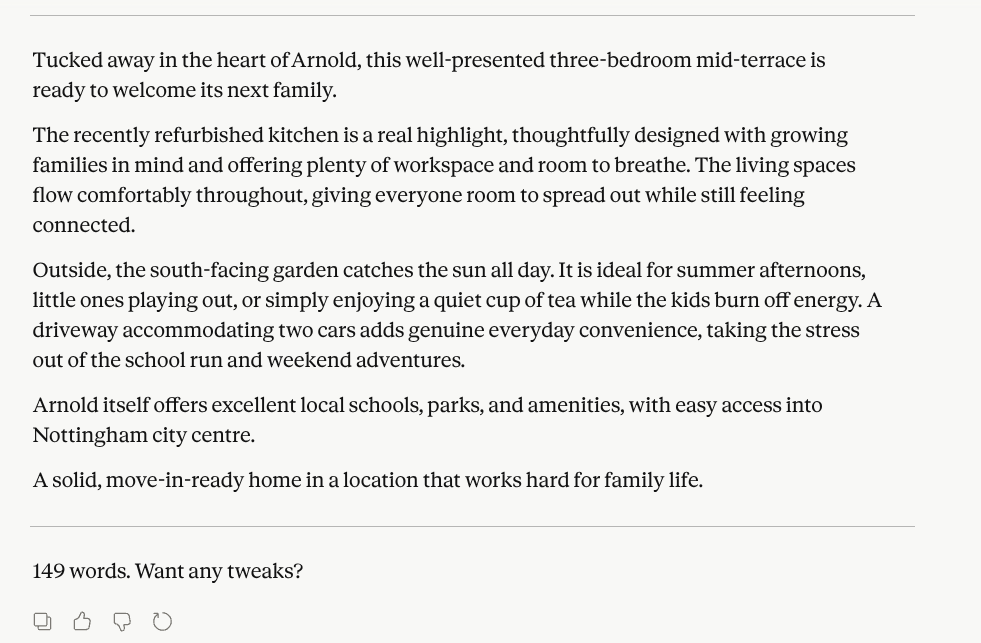
“Write a [word count]-word property description for a [property type] in [location]. Key features: [list the main selling points]. Target buyer: [who is buying this]. Tone: [how it should sound]. Do not use [any clichés or phrases to avoid].”
Which Tool to Use for Descriptions
Claude. More clearly than for any other task here.
ChatGPT handles portal lead replies and update emails well. For descriptions, Claude produces a less generic draft from the same brief. Fewer clichés out of the box. Better at holding a consistent tone across the whole piece. Less editing at the end.
Run the same brief in both and see which output needs fewer changes. Most agents who try the comparison arrive at the same answer. The Blog 4 comparison guide covers all three main tools if you want more detail before committing to one.
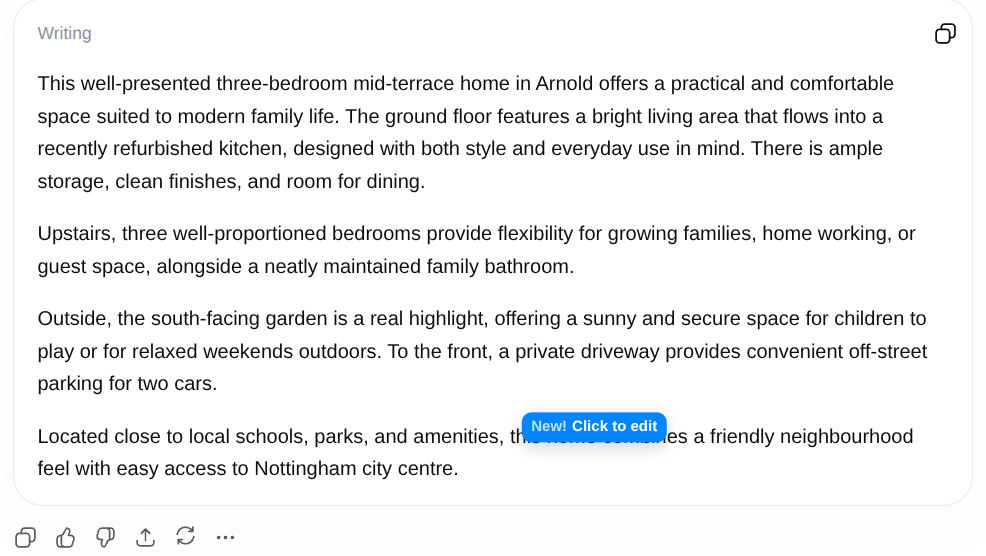
Three Description Types: Copy-Paste Briefs
These work as starting points. Swap the details, change the location, use them today.
Family Home
“Write a 180-word property description for a four-bedroom detached house in Bingham, Nottinghamshire. Key features: recently extended kitchen-diner, landscaped rear garden, double garage, quiet cul-de-sac. Target buyer is a growing family looking for space and a good secondary school catchment. Warm and welcoming tone. No use of the word stunning or the phrase “perfect for entertaining.”
First-Time Buyer Flat
“Write a 150-word property description for a two-bedroom ground floor flat in West Bridgford. Key features: allocated parking, private patio, recently decorated throughout, close to tram link. Target buyer is a first-time buyer or young couple. Modern and approachable tone. No mention of lease length or service charge.”
Buy-to-Let or Investor Property
“Write a 150-word property description for a two-bedroom mid-terrace in Basford, Nottingham. Key features: currently tenanted, close to QMC, new boiler fitted 2023, strong local rental demand. Target buyer is a landlord or property investor. Factual and confident tone. Do not mention the current tenancy end date.”
Save the brief, not only the output
The first time you write a good brief for a flat, save it. Next time you have a similar property, paste the saved brief in and update the details. Within a fortnight you will have a working brief for each of your most common property types. You are not starting from scratch each time. You are swapping the specifics.
What to Check Before It Goes on the Portal
Three things to look for before you copy anything to Rightmove or Zoopla.
Anything AI added that you did not give it. AI fills gaps. If you did not mention flood risk, EPC rating, or broadband speed, nothing about those should appear in the output. Check what it added that was not in your brief.
Anything vague or generic. “Beautifully presented” and “much-loved home” tend to creep back in regardless of your constraints. Edit them out every time.
Anything that sounds like a fact. Room dimensions, parking specifics, catchment references, service charge figures, lease terms. AI phrases things confidently. It does not have access to your EPC, the title register, or the vendor’s instructions. Every statement of fact needs checking against those documents before the listing goes live.
AI does not know what constitutes material information under the Consumer Protection from Unfair Trading Regulations. That responsibility sits with you. Treat the output as a draft, not a finished document.
The guide on why AI gets things wrong covers exactly which types of mistake to watch for and how to catch them before they matter.
Do not let it go out unchecked
AI writes words. You sign the listing.
Lease terms, service charges, school catchment, flood-risk status, EPC ratings. None of these should appear in a description unless you have confirmed them from the relevant document. AI generates plausible text. It does not verify facts.
Misrepresenting a property, even unintentionally, is a breach of the Consumer Protection from Unfair Trading Regulations. Read every word before it goes on a portal.
Not Sure How to Brief It?
The Prompt Machine builds the brief for you. Pick your property task, answer three questions, and it writes a prompt you can paste straight into Claude or ChatGPT. Free. Takes about sixty seconds.
Try the Prompt Machine → One page. No signup faff.Building a Description Library
The first brief takes the longest. By the time you have done it a dozen times across your most common property types it becomes habit.
After a month, you will have saved briefs covering most of what lands on your desk. Paste the saved brief in, update the property specifics, read the draft, make the changes.
The time saving is not in one description. It is in the fortieth.
If you want to take listing content further, the guide to auto-posting new listings to Instagram uses the same brief to generate and post a branded carousel automatically.
If you want the full toolkit for writing portal replies alongside descriptions, Part 3 of this series covers Rightmove and Zoopla enquiries specifically.
Try This Before the End of the Week
Pick a property you are listing this week. Write a brief using the template above. Include the key features, the target buyer, the tone, the word count, and at least one thing to avoid.
Paste it into Claude. Read what comes back. Edit it.
If the editing time is shorter than starting from scratch, save the brief. That is your template for that property type from now on.
Questions People Actually Ask
Yes. Give it the key features, target buyer, tone, word count, and any phrases to avoid. It produces a working draft in under a minute. You edit and check before it goes anywhere. The quality of the brief determines the quality of the output.
Claude produces a less generic draft than ChatGPT from the same brief. Run the same prompt in both and see which needs less editing. Most agents who try the comparison reach the same conclusion.
Be specific in the brief. Include the property type, key selling points, the target buyer, the tone, and at least one phrase to avoid. Generic input produces generic output every time.
Specify it in your brief. 150 words is a reasonable starting point for most portal listings. Without a word count, AI picks its own length and is usually off.
Always. AI fills gaps you did not brief it on, adds vague language regardless of constraints, and has no access to the EPC, title register, or vendor’s instructions. Read every word before it goes live.
No, provided the output is edited before publication. A well-briefed, well-edited AI description is indistinguishable from one written from scratch. The risk is sending it unedited.
Include a constraint in your brief. Name the specific phrases you want removed. AI will still occasionally add them, so read the output, but a named constraint reduces it significantly.
No. AI must never be the source of material information. Lease terms, service charges, EPC ratings, flood-risk status, and school catchment details all need verifying against the relevant documents before they appear in any listing. AI generates plausible text. It does not check facts.
Property type and location, the key features worth leading with, the target buyer, the tone, the word count, and anything to avoid. Those five things give it enough to produce a useful first draft.
How to Reply to Rightmove and Zoopla Enquiries Faster With AI
Property descriptions sorted. The next time drain is portal enquiries. The same reply, forty times a week, one at a time. This guide covers how to build a prompt template that handles most of them in under two minutes.
Read Part 3 →