
- ◆Vendor and buyer updates follow the same format every time. The milestone changes. The structure does not.
- ◆Five email types. Five ready-to-use prompts. Vendor update, mortgage update, solicitor chaser, exchange confirmed, completion day. Brief it, swap the details, read it, send it.
- ◆This guide also covers how to automate the triggers with Make.com for agents handling high volumes.

The sale is agreed. The hard part should be done.
Except now there are fifteen update emails to write this week. Vendor chasers. Buyer chasers. Solicitor progress messages. Mortgage updates. Each one starts the same way. “Just a quick update on your sale.” Delete. Start again. Write something that sounds vaguely human. Send it. Do the same thing next Wednesday.
Sales progression is the most repetitive writing task in an estate agent’s week. Same format, same milestones, same reassuring tone. The information changes. The structure does not.
That is exactly what AI is for.
What You Will Learn
– Why sales progression emails work well with AI
– The five email types worth templating
– What to include in the brief for each one
– How to take it further with Make.com automation
– What to check before anything goes out
Why Sales Progression Emails Work Well With AI
Most sales progression emails share the same structure. You state where the case is. You say what is happening next. You manage expectations without making promises. You close with something that keeps the client calm.
The inputs are predictable. The milestone, the parties, the tone, what not to commit to. Give AI those four things clearly and the draft is usable in under two minutes. The thinking happened once. After that you are just swapping the details.
If you want more detail on writing a brief that gets the right output first time, the AI prompt writing guide covers the five-part formula in full.
The Five Email Types Worth Templating
These cover the majority of what you write during a standard sale. Build a prompt for each one and most of your progression inbox is covered.
Your starting template for any sales progression email
Write a [word count]-word [vendor / buyer] update email. Current status: [what has happened]. Next step: [what happens next and rough timescale]. Tone: reassuring and professional. Do not give any guarantees on exchange or completion dates. Do not mention [anything sensitive or unconfirmed].
1. Vendor Update After Offer Agreed
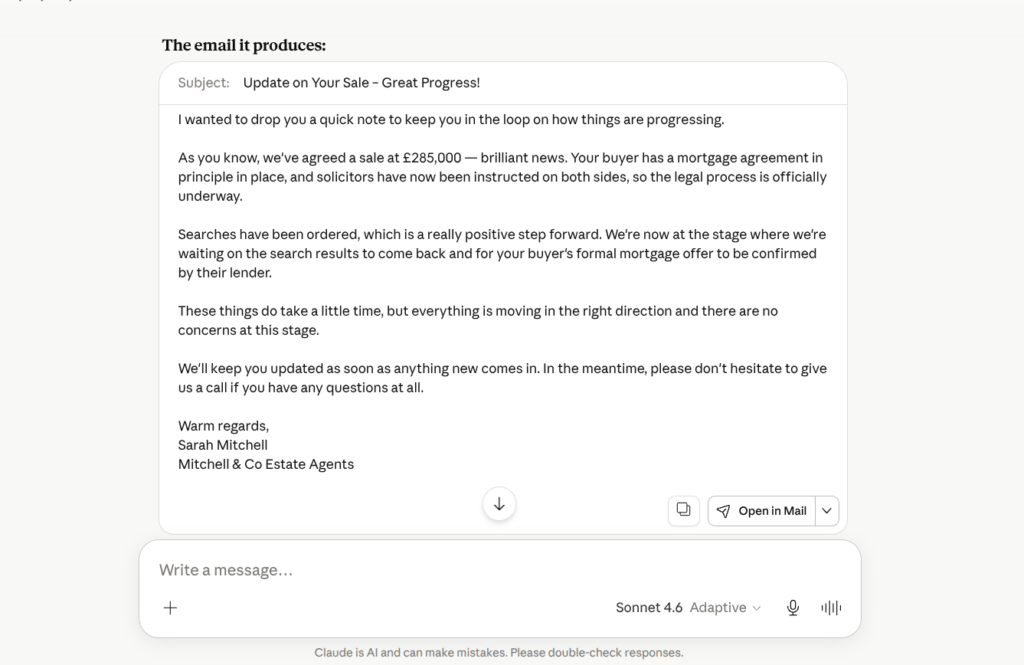
Goes out once the sale is agreed and the chain picture is becoming clearer. Vendors are at their most anxious at this stage. Warm tone, clear next steps, no promises.
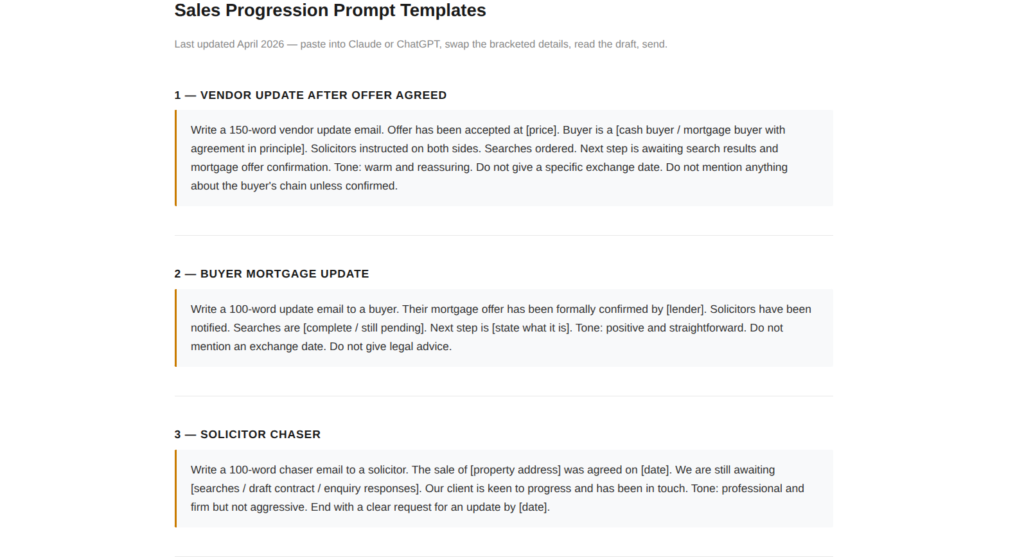
“Write a 150-word vendor update email. Offer has been accepted at [price]. Buyer is a [cash buyer / mortgage buyer with agreement in principle]. Solicitors instructed on both sides. Searches ordered. Next step is awaiting search results and mortgage offer confirmation. Tone: warm and reassuring. Do not give a specific exchange date. Do not mention anything about the buyer’s chain unless confirmed.”
2. Buyer Mortgage Update
Sent when a mortgage milestone lands. Offer confirmed, valuation booked, surveyor instructed. Brief and factual. Buyers want to know things are moving.
“Write a 100-word update email to a buyer. Their mortgage offer has been formally confirmed by [lender]. Solicitors have been notified. Searches are [complete / still pending]. Next step is [state what it is]. Tone: positive and straightforward. Do not mention an exchange date. Do not give legal advice.”
3. Solicitor Chaser
The email nobody enjoys writing. Firm enough to prompt action, professional enough not to burn a relationship. AI keeps the tone consistent when you would rather just vent.
“Write a 100-word chaser email to a solicitor. The sale of [property address] was agreed on [date]. We are still awaiting [searches / draft contract / enquiry responses]. Our client is keen to progress and has been in touch. Tone: professional and firm but not aggressive. End with a clear request for an update by [date].”

4. Exchange Confirmed
Good news email. Should feel like it. Keep it brief, confirm the completion date, set out what happens next for the client.
“Write a 120-word email confirming exchange of contracts to a [vendor / buyer]. Exchange happened today [date]. Completion is confirmed for [date]. Include a brief note on what they need to do before completion: [list any relevant actions]. Tone: warm, clear, and celebratory without being over the top.”
5. Completion Day Message
The last email in the chain. Warm, brief, and personal. This one is worth spending an extra minute on rather than sending a generic congratulations. AI gets you 80% there. Add something specific before you send.
“Write a short completion day message to a [vendor / buyer]. Completion has taken place today. Keys [have been released / are ready to collect from our office]. Tone: warm and personal. Under 80 words. Do not sound like a template. End with something genuine about working with them.”
Save the prompt, not just the output
The first time you write a good brief for a solicitor chaser, save it. Next time, paste it in and swap the property details. Within a week you will have all five templates saved and ready. Replying to progression queries becomes paste, swap, read, send. The thinking only happens once.
What to Include in the Brief
Four things in every brief, regardless of which email type you are writing.
The milestone. What has just happened or what you are communicating. Specific and factual.
The parties. Vendor or buyer. Whether there is a chain. Any relevant detail about the solicitors or mortgage lender involved.
The tone. Reassuring for vendors who have been waiting three weeks. Direct for a solicitor who has not responded. Warm for a completion day message. Tell it, and it follows.
What not to say. No exchange date unless confirmed. No completion date unless exchange has happened. No mention of chain issues unless the client already knows. Name the constraints and they are less likely to appear.
Taking It Further With Make.com
For agents handling high volumes, writing the email is only part of the problem. Remembering which case needs an update and when is the other part.
Make.com handles the trigger side. Set it to watch a case status in your CRM or a Google Sheet. When a status changes — mortgage confirmed, searches back, exchange booked — it fires a notification or drafts a message automatically.
It does not replace the writing step entirely. But it removes the “which cases need an update today” problem, which is where most progression follow-up falls through the gaps.
If you want more control over deliverability than Gmail gives you, GetResponse connects to Make.com and handles the email sending side. Worth considering if you are sending progression updates at volume.
The lead follow-up automation guide covers the Make.com build in detail. The same structure applies here. Trigger, delay, email. Swap the content for progression updates and the logic is identical.
The Make Master will tell you exactly which modules to use for your CRM or spreadsheet setup. Free. About sixty seconds.
Start with AI drafting. Add automation later.
You do not need Make.com to save time this week. Start with the five prompt templates above. Use them manually for a month. Once the templates are bedded in and you know which triggers make sense for your workflow, the automation step is much easier to build.
What to Check Before It Goes Out
Sales progression emails contain information clients will act on. Read every one before it sends.
No implied timelines. “We expect exchange within the next few weeks” sounds helpful. It is a commitment you cannot keep. Check the output for any language that sounds like a prediction.
No unconfirmed details. AI fills gaps. If you did not give it the search result or the mortgage offer date, check whether it invented one. It sometimes does.
Names are correct. Solicitor firm names, buyer names, vendor names. AI does not carry these through automatically if you did not include them in the brief.
The tone fits the situation. A firm chaser sent in a warm tone loses its point. A vendor update sent in a terse tone causes a phone call. If the register feels off, add a tone instruction to your template.
Never commit to a date you have not confirmed
AI will sometimes add exchange or completion date estimates based on what sounds reasonable. If a date appears in the output that you did not put in the brief, remove it before the email goes out. Clients remember dates. If the date slips, you own it.

Want the Brief Built for You?
The Prompt Machine builds the prompt for each email type. Pick your task, answer three questions, and get something to paste straight into Claude or ChatGPT. Free.
Try the Prompt Machine → Free. One page. No signup faff.Try This Before the End of the Week
Pick one update email you sent this week. Write a brief for it using the starting template above. Run it in Claude. Compare the time and the output to what you wrote from scratch.
If the draft is close enough to edit rather than rewrite, save the brief. That is your template for that email type from now on.
Do the same for one more next week. By the end of the month you will have all five covered.
The same approach works for property descriptions. The brief is different but the habit is the same.
The same habit works for portal enquiry replies. Different email type, same approach.
Questions People Actually Ask
Yes. Give it the milestone, the parties involved, the tone, and what not to include. It produces a usable draft in under two minutes. Read it and edit before it goes out.
Where the sale currently stands, what the next step is, and a rough timescale without committing to a specific date. Keep it reassuring and under 150 words. Clients want to know things are moving, not a full legal summary.
Include a constraint in your brief. “Do not give any exchange or completion dates” and “do not mention anything not included in this brief” both reduce the risk. Read the output before it goes anywhere.
Claude and ChatGPT both handle sales progression emails well. Use whichever you already have open. The brief matters more than the tool.
Yes. Make.com watches for case status changes in your CRM or a Google Sheet and fires a trigger when something changes. The lead follow-up automation guide on this site covers the same build structure. Swap the content for progression emails and the logic is identical.
Five covers most situations. Vendor update after offer agreed, buyer mortgage update, solicitor chaser, exchange confirmed, and completion day message. Build those once and most of your progression inbox is covered.
No, provided you read and edit the output before sending. A well-briefed, well-edited AI email is indistinguishable from one you wrote yourself. The risk is sending it unread or with details you did not verify.
Exchange or completion dates unless they are confirmed. Details about the other party’s chain unless the client already knows. Anything that sounds like legal advice. Read the output carefully for anything the brief did not explicitly include.
Also in this series
Part 1: How to Auto-Post New Listings to Instagram
Part 2: AI for Property Descriptions: How Estate Agents Save Time
Part 3: How to Reply to Rightmove and Zoopla Enquiries Faster With AI
Part 4: How to Stop Writing the Same Sales Progression Emails Every Week — you are here
Part 5: How Estate Agents Are Using AI to Win More Instructions
Part 6: Does AI Really Work for Estate Agents or Is It Hype?
Read Part 5 →