
- ◆Same questions. Same property types. Same replies. Written from scratch every day.
- ◆A saved prompt template fixes that. Paste in the enquiry. Swap the property details. Draft back in thirty seconds. Read it, edit it, send it.
- ◆This guide covers six enquiry types, ready-to-use prompts for each, and what to check before any reply goes out.

Rightmove and Zoopla enquiries are the same few questions on repeat. Is it still available. Can I arrange a viewing. Is there flexibility on the price. You have answered them all before.
The question is not how to write the reply. The question is why you are writing it from scratch every time.
A saved prompt template fixes that. Swap in the property details, paste the enquiry, and get a draft back in seconds.
Why Portal Enquiries Work Well With AI
The inputs are predictable. Most Rightmove and Zoopla enquiries fit into about six categories, and the property details you need to include do not change much from one reply to the next.
When the inputs stay the same, the output is usually close enough to use with a light edit.
What a prompt template is
A prompt template is a brief you reuse. It tells AI what kind of reply you need, what tone to use, and what to include or avoid. You write it once. You use it every time that enquiry type arrives.
The prompt writing guide covers how to build a good brief if you want more detail on the formula.
The Six Enquiry Types Worth Templating
These cover the majority of what lands in your portal inbox on any given day. Build a template for each one and most of your inbox is covered.
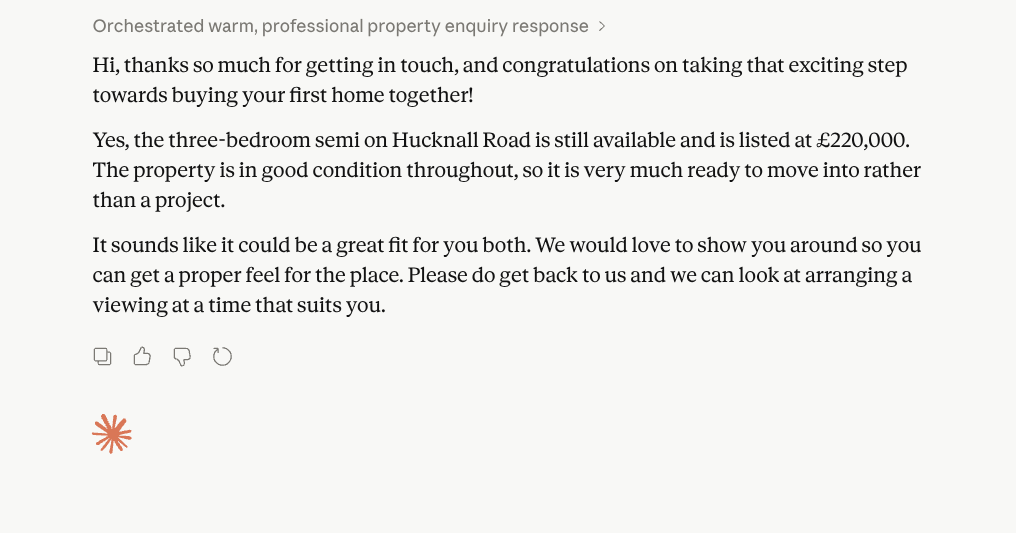
Availability checks. “Is this still on the market?” AI should confirm availability clearly and end with an invitation to arrange a viewing.
Viewing requests. “I’d like to arrange a viewing.” AI should acknowledge the request, avoid confirming a slot, and say you will follow up to arrange a time.
Price and negotiation questions. “Is there any flexibility on the asking price?” AI should acknowledge the question, avoid committing, and redirect towards booking a viewing.
Buyer position questions. “We are first-time buyers, can you help with a mortgage?” AI should respond warmly and acknowledge their position.
Property specifics. “Is there off-street parking?” or “What is the EPC rating?” AI should answer only from the detail you give it. No filling gaps.
No longer available. The property has sold or let. AI should keep it brief, empathetic, and offer to register them for similar instructions.
You do not need a template for every possible question. These six handle the vast majority of what arrives.
“Write a [word count]-word reply to a Rightmove or Zoopla enquiry from a prospective [buyer / tenant]. Their message: “[paste the enquiry here]”. Property: [type, location, asking price]. Tone: [friendly and professional / warm and approachable]. Mirror the question they asked. Do not promise anything that has not been confirmed. End with a clear next step.”
Ready-to-Use Prompts for Each Enquiry Type
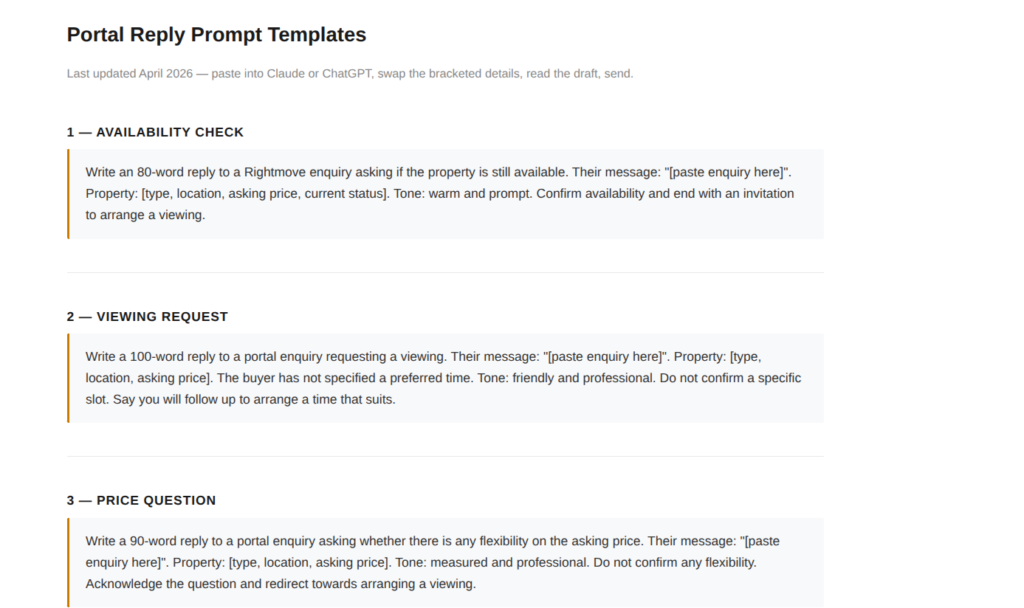
Swap the property details and paste into Claude or ChatGPT. For a full comparison of which tool works best for which task, the Blog 4 comparison guide covers it in detail.
Availability Check
“Write an 80-word reply to a Rightmove enquiry asking if the property is still available. Their message: “[paste enquiry here]”. Property: two-bedroom terraced house in Kirkby-in-Ashfield, asking price £175,000, currently active on the market. Tone: warm and prompt. Confirm availability and end with an invitation to arrange a viewing.”
Viewing Request
“Write a 100-word reply to a Zoopla enquiry requesting a viewing. Their message: “[paste enquiry here]”. Property: three-bedroom detached in Ravenshead, asking price £375,000. The buyer has not specified a preferred time. Tone: friendly and professional. Do not confirm a specific slot. Say you will follow up to arrange a time that suits.”
Price Question
“Write a 90-word reply to a portal enquiry asking whether there is any flexibility on the asking price. Their message: “[paste enquiry here]”. Property: four-bedroom detached in Bingham, asking price £425,000. Tone: measured and professional. Do not confirm any flexibility. Acknowledge the question and redirect towards arranging a viewing.”

No Longer Available
“Write an 80-word reply to a Rightmove enquiry about a property that has now sold. Their message: “[paste enquiry here]”. Tone: warm and brief. Do not apologise. Mention similar properties and offer to register their details for new instructions.”
Build your templates once, use them indefinitely
Spend thirty minutes this week writing a prompt for each of your six main enquiry types. Save them in a notes app, a Google Doc, or wherever you keep reference material you return to. From that point, replying to a portal enquiry is paste, swap the details, read, send. The setup time pays back in the first week.
Which Tool to Use
Claude and ChatGPT both handle this well. Use whichever you already have open. The brief matters more than the tool.
What to Check Before You Send
Check four things before you send.
No promise was made. No confirmed viewing times, no price flexibility, nothing you have not cleared with the vendor.
The tone suits the enquiry. A reply to a first-time buyer should not read like a corporate letter. If the register is off, add a tone instruction to your template.
The name is right. If the enquirer gave their name, the reply should use it. AI does not always carry names through automatically.
Nothing was invented. AI will sometimes add property details that were not in your brief. If it sounds like a fact, confirm it before the reply goes out.
Do not send a reply you have not read
A portal reply is your first contact with a potential buyer or tenant. AI drafts the words. You are responsible for what gets sent. Read every reply before it leaves your inbox.
10 AI Prompts Every Property Professional Should Steal
Ten copy-paste prompts built for estate agents, letting agents, mortgage brokers and tradespeople. No AI experience needed.
Get the Free Prompts → Free. One page. No signup faff.Connecting Replies to Your Follow-Up Process
A portal reply is the start of a sequence, not a standalone message. Once someone responds, what happens next matters as much as the first contact.
If you are managing follow-up manually across email, portal messaging, and phone calls, leads fall through the gaps. The lead follow-up automation guide covers how to build a sequence that keeps prospects warm without tracking each one individually.
Pair the templates here with a follow-up process and the two things work together.

Try This Today
Open your portal inbox. Pick the last five enquiries and sort them into the six categories above.
Write a template for the most common type. Test it on one enquiry. Read what comes back.
That is your first template done.
Questions People Actually Ask
Yes. Give it the enquiry text, basic property details, and a tone instruction and it produces a working draft in under thirty seconds. You edit what is off and check it before sending. The brief determines the quality of the output.
Both Claude and ChatGPT handle this well. Use whichever you already have open. The brief matters more than the tool.
Include the specific enquiry text in your brief, name the property type and location, and add a tone instruction. Tell it to mirror the question asked and end with a clear next step.
Availability checks, viewing requests, price questions, buyer position questions, property specifics, and no longer available messages. Those six types cover the majority of what arrives in most agents’ portal inboxes.
Always. Check for any unconfirmed promises, any invented property details, the correct name, and whether the tone suits the enquiry. Read every reply before it goes out.
No, provided you read and edit the output before sending. A well-briefed, well-edited AI reply is indistinguishable from one you wrote yourself. The risk is sending it unread.
Six covers most situations: availability, viewing requests, price questions, buyer position, property specifics, and no longer available. Build those once and most of your portal inbox is covered.
AI handles the first draft well. For a follow-up sequence that keeps leads warm automatically, that moves into automation territory. The lead follow-up automation guide covers this in detail.
Also in this series
Part 1: How to Auto-Post New Listings to Instagram
Part 2: AI for Property Descriptions: How Estate Agents Save Time
Part 3: How to Reply to Rightmove and Zoopla Enquiries Faster With AI — you are here
Part 4: How to Stop Writing the Same Sales Progression Emails Every Week
Part 5: How Estate Agents Are Using AI to Win More Instructions
Part 6: Does AI Really Work for Estate Agents or Is It Hype?
Read Part 4 →