
- ◆AI produces generic output because it knows nothing about you. Context is how you fix that.
- ◆Layer 1: who you are. Your role, your business, your location. One or two sentences stops AI defaulting to the wrong tone entirely.
- ◆Layer 2: the specific situation. What has happened and what is needed. Without it, AI writes for a hypothetical scenario, not yours.
- ◆Layer 3: the reader. Who the output is for and what they already know. This is where most of the quality gap lives.
- ◆A reusable business introduction template you write once and paste into every prompt from here. Worked examples for estate agents, letting agents, and mortgage brokers.
- ◆The one context mistake that wastes the most time, and what to do instead.

Every time you open a new AI chat, it knows nothing about you.
Not your business, not your clients, not how you write. You are starting from zero every single time.
Most UK property professionals who find AI frustrating are not using the wrong tool. They are giving it nothing to work with and wondering why it produces nothing useful back.
The fix is context. Tell AI who you are, what the situation is, and who the output is for. Do that before you ask it anything and the result changes. This post covers the three layers that make the biggest difference, a reusable template you write once and paste into every prompt, and the one context mistake that wastes more time than any other.
If you have not read Post 1 in this series, it covers the four prompting mistakes that cause most bad responses. Worth five minutes before continuing.
What Context Means and Why It Improves AI Output
Context is not just background information. It is anything AI needs to produce output that fits your situation rather than a generic version of it.
Most people give AI the task and nothing else. The task tells AI what to produce. Context tells it what kind of thing to produce, for whom, and in what voice. Without it, AI makes assumptions. Those assumptions are almost never right.
A prompt without context is a prompt without a brief
Asking AI to write an important client email with no background, no idea who the client is, and no sense of how your business communicates. You would not do that to a new member of staff. AI is no different. The briefing determines the output.
There are three layers. Each one improves the output on its own. Together they change it entirely.
The Three Context Layers Every Prompt Needs
Layer 1: Who You Are
Your role, your business type, your location. One or two sentences is enough.
“I am a letting agent in Sheffield managing a portfolio of 180 residential properties. My clients are working professionals and families. I write in plain English and never use industry jargon with tenants.”
This one layer stops AI defaulting to American spellings, formal legal language, and a tone that sounds like a call centre script. Worth the thirty seconds it takes.
Layer 2: The Specific Situation
What has happened, what is needed, what the current status is. The more precise, the better.
“I have a tenant who is fourteen days overdue on rent. This is the second time in four months. I have already sent one reminder with no response.”
Without this, AI writes a standard rent chaser. With it, AI writes a second-contact communication with appropriate firmness built in. Those are two very different emails and only one of them is appropriate to send.
Layer 3: The Reader
Who the output is for. Their situation. What they already know. What they expect from you.
“The tenant is a young professional who has been with us two years. Usually reliable. No previous issues before the last four months.”
This changes the entire tone of the output. AI now writes to a specific person in a specific situation, not a placeholder called “tenant.” That is where most of the quality gap is.
Build a context block you reuse every time
Write two or three sentences that describe your business, your clients, and your tone. Paste them at the start of any prompt. One minute to write once, saves time on every prompt after that. The next section shows you exactly how.
A Before and After Showing All Three Layers
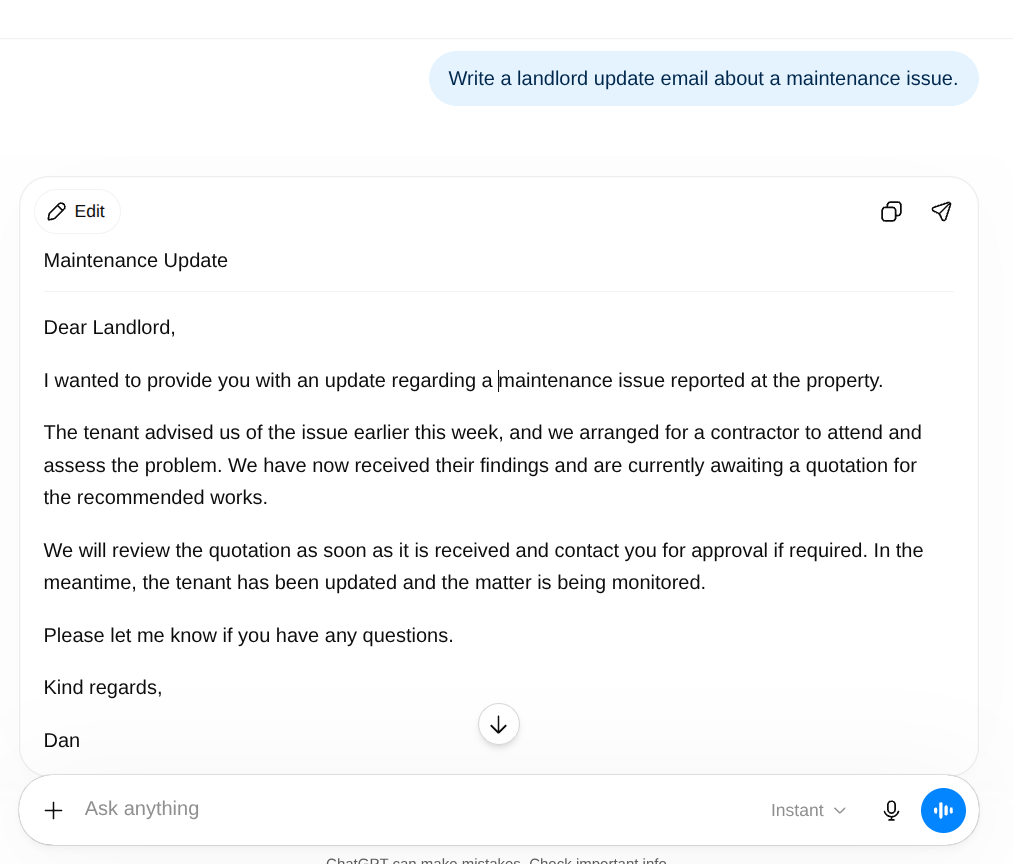
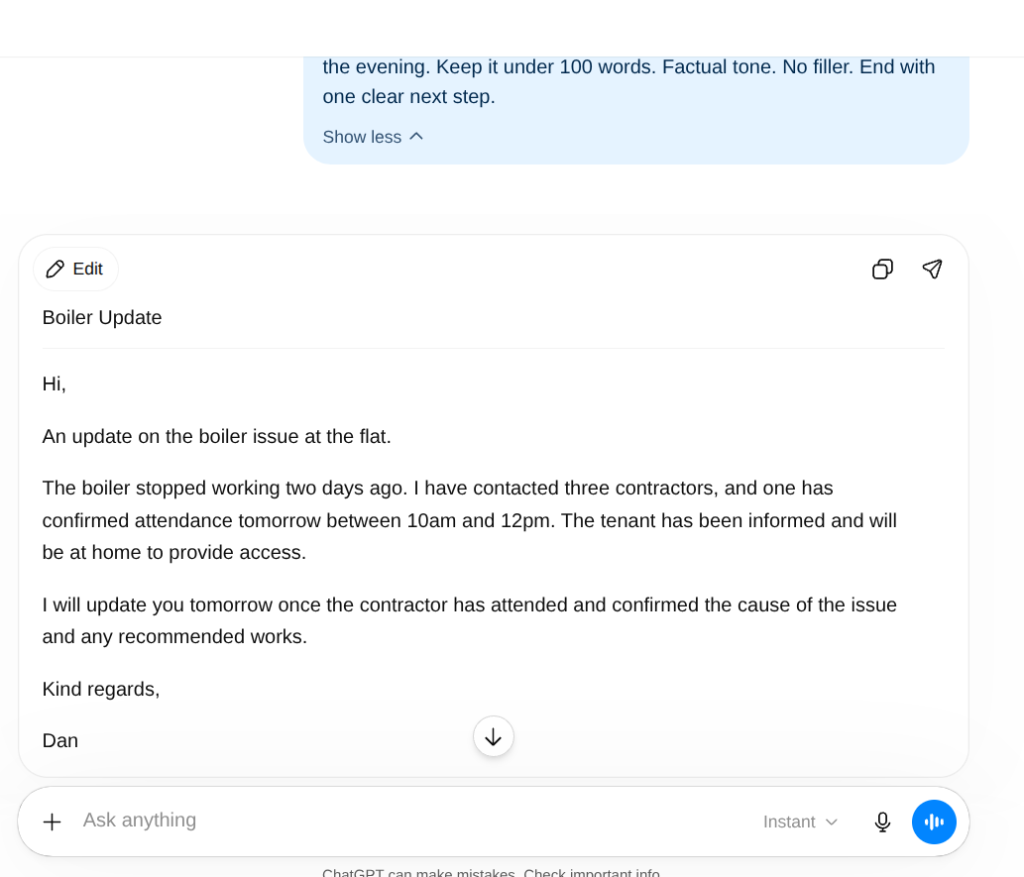
Same task both times. The first prompt gives AI nothing to work with. The second gives it everything it needs.
“Write a landlord update email about a maintenance issue.”
“Write a brief landlord update email. I am a property manager in Leeds. My landlord owns two flats with us and has been a client for four years. He is straightforward and prefers short factual updates with no padding.
The situation: a boiler in one of his flats stopped working two days ago. I have contacted three contractors. One is confirmed to attend tomorrow between 10am and 12pm. The tenant has been informed and is fine to be home.
The reader: the landlord is at work during the day and checks emails in the evening. Keep it under 100 words. Factual tone. No filler. End with one clear next step.”
The before version produces a template. The after version produces something you send.
Before and After: Three Property Roles
Estate Agent: Vendor Update
“Write a vendor update email.”
“Write a brief vendor update email. I am an estate agent in Coventry. My vendor has been on the market eleven weeks at £285,000. Nine viewings and two second viewings, one of which fell away last week. The remaining second viewing couple are still interested but have not committed. My vendor is anxious and checks in regularly. Tone: honest, calm, reassuring without being falsely positive. Under 120 words. No empty phrases like ‘the market is moving in the right direction.'”
For more vendor and buyer update templates, the sales progression email guide has five ready-to-use prompts covering the full transaction journey.
Letting Agent: Tenancy Renewal
“Write a tenancy renewal email.”
“Write a tenancy renewal email. I am a letting agent in Cardiff. The tenant has been in the property three years and has been excellent throughout. The landlord wants to renew with a modest rent increase, which I will insert before sending. Tone: warm, straightforward, appreciative of their tenancy. Explain the increase briefly without over-justifying it. Include a placeholder for the new rent figure. Ask them to confirm whether they want to proceed. Under 120 words.”
Mortgage Broker: Pre-Application Explainer
“Explain what happens during a mortgage application.”
“Write a plain English explainer for a first-time buyer about what happens during a mortgage application. I am a mortgage broker in Manchester. My client is buying their first home and has never applied for a mortgage before. They are nervous about the process. Tone: reassuring, clear, no jargon. Cover the main stages briefly: fact find, agreement in principle, full application, valuation, offer. Do not reference specific products or lenders. Do not state timelines as guarantees. Under 200 words.”
Your Business Introduction Prompt
This is the section worth spending ten minutes on now rather than later.
A business introduction prompt is a short block of context you write once and paste at the start of any prompt. It covers who you are, who your clients are, and how you communicate. Every output after that starts from the right place rather than from scratch.
“I am a [role] at [business name], a [type of business] based in [location]. My clients are [brief description]. I write in plain English, British English spelling, and a [tone description] tone. Avoid formal or corporate language unless the situation specifically requires it.”
“I am a senior negotiator at Hargreaves Property, an independent estate agent based in Derby. My clients are vendors and buyers across Derby and the surrounding villages. I write in plain English, British English spelling, and a warm but professional tone. Avoid corporate language. Every sentence should contain information rather than filler.”
“I am a mortgage broker at Clearstone Financial, an independent brokerage based in Bristol. My clients are first-time buyers, home movers, and landlords. I write in plain English, British English spelling, and a reassuring, informative tone. Do not include specific product recommendations or interest rates unless they are provided in the prompt. Avoid anything that reads as regulated advice.”
Save your version somewhere you access every day. A notes app, a pinned document, anywhere within ten seconds of a new chat. Paste it before every prompt.
One document, ten seconds, every prompt better than it would have been.

What to Include for Specific Task Types
Different tasks need different context. Here is a quick reference for the most common ones in UK property work.
For client emails. The recipient’s relationship with you, what they already know about the situation, what action you want them to take, and any language to avoid. For regulated communications, include a constraint telling AI not to reference legal proceedings or specific legislation unless you provide it.
For property descriptions. Property type, location, key features, target buyer, word count, tone, and at least two things to avoid. “No words like stunning or beautiful” does a surprising amount of work on its own. The full guide to AI property descriptions covers exactly what to give it.
For vendor or landlord updates. Current status of the transaction or tenancy, what has changed since the last contact, what you want the reader to do or feel after reading, and the word count. Vendor updates should almost always be under 120 words.
For social media posts. Platform, audience type, tone, whether the post needs a call to action, and whether the link goes in the post or the comments.
For meeting or call summaries. Who was on the call, what was agreed, what the next steps are, and who owns each one. Give AI a rough set of notes rather than asking it to summarise from memory. It has no memory between sessions.
Map the context before you write the prompt
Useful if you are building context blocks for more than one task type and want to map the workflow before writing the prompts. The Blueprint Drawer does that for you. Free, no sign-up needed.
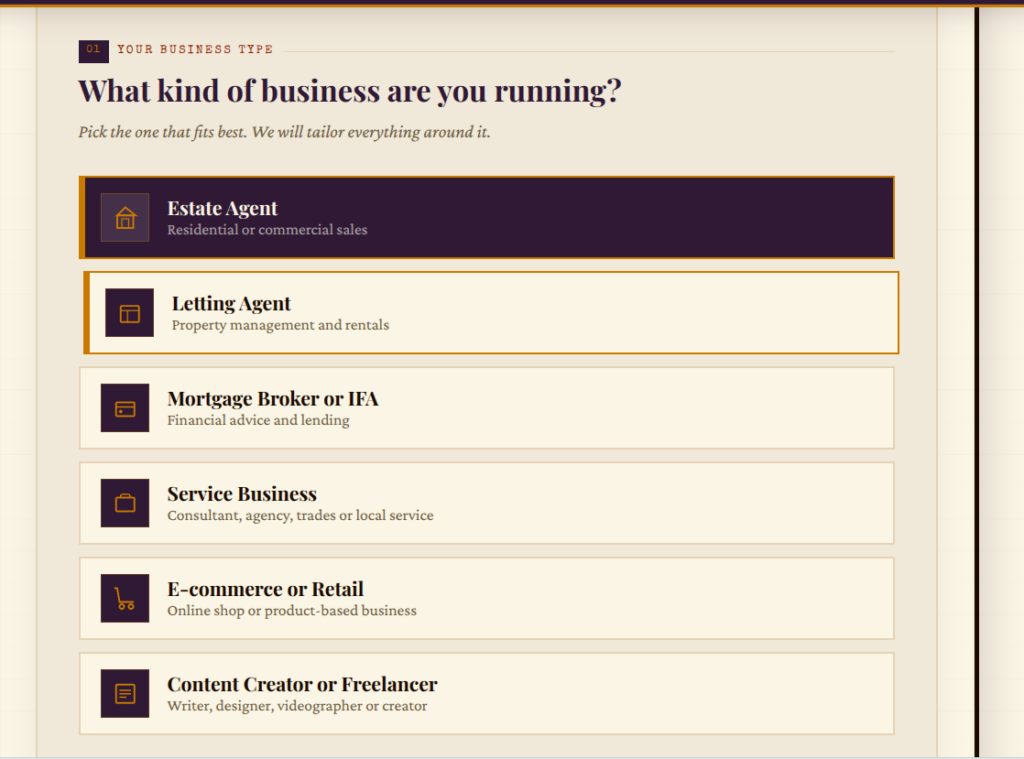
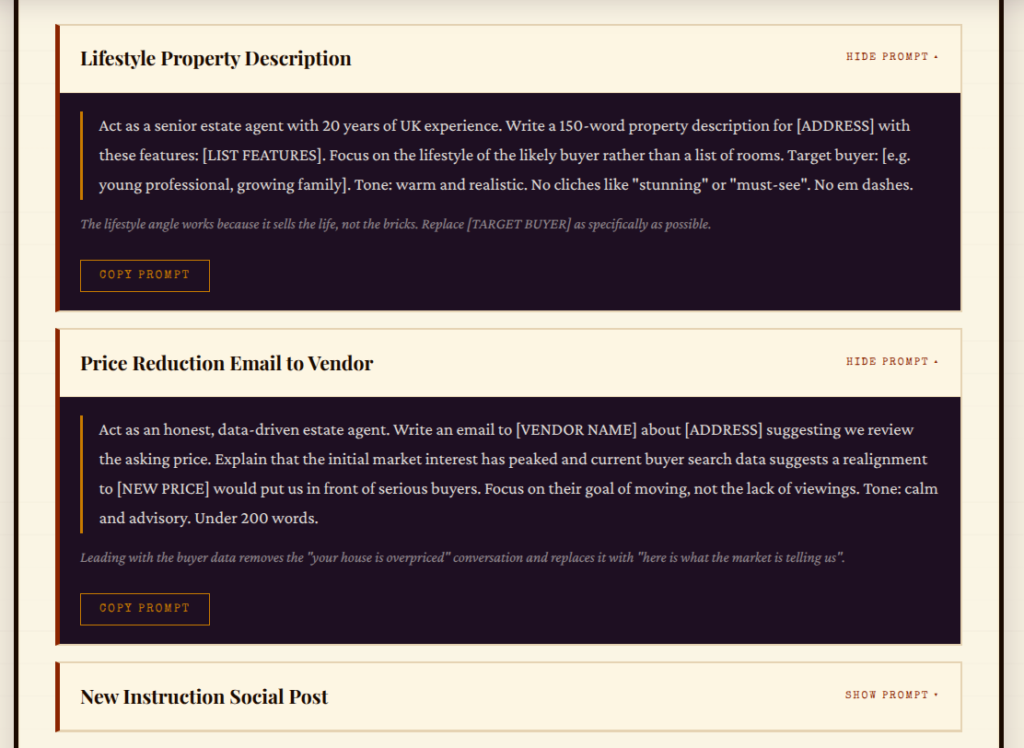
The Blueprint Drawer maps the context and workflow before you write the prompt. Free, no sign-up needed.
The Context Mistake That Wastes the Most Time
Adding context after AI has already produced a bad first draft.
It helps. A follow-up prompt with better context produces a better second draft. But it does not produce as good a result as starting with the context in place.
One minute spent on context before you send the prompt saves five minutes of editing after. The time saving is real.
The reason most people skip it is the blank box. Opening a new chat and typing into nothing feels like the fastest route. It is not. The fastest route is a business introduction already copied, three sentences of situation context, and a clear task. That combination produces something closer to usable on the first attempt.
Context that includes data needs checking
If your context includes figures, dates, legislation, or regulatory information, verify it before pasting it in. AI uses whatever context you give it. Incorrect context produces confidently incorrect output. For anything compliance-adjacent, check it before it reaches a client. The guide to why AI gets things wrong covers exactly what to watch for.
Do This Before Your Next Prompt
Write your business introduction now.
Two or three sentences. Your role, your clients, your tone. Paste it somewhere you open every day.
Then use it on the next prompt you write today. See what comes back compared to a prompt without it.
Ten minutes once. Every prompt better from here.
Already read Post 1?
Post 1 in this series covers the four mistakes that produce bad AI responses, including the most common one: not being specific enough. Worth five minutes if you have not read it yet.

Ten Prompts Worth Stealing
Ten property-specific prompts ready to copy. Each one includes the situation, the tone, the format, and the constraints. Ready to use today.
Get the Free Prompt Pack → Only Email Signup NeededQuestions People Actually Ask
Three things: who you are and your role, the specific situation the output relates to, and who will read it. Those three layers produce output that fits your situation rather than a generic one.
Include a tone instruction in your prompt. Plain English, warm but professional, no corporate language takes ten seconds to add and changes the output significantly.
Yes. AI has no memory between sessions. Build a short business introduction you paste at the start of every prompt. Write it once, reuse it every time.
If you are writing more than a short paragraph for a simple task, you are over-explaining. Task, situation, reader, tone. That covers most things.
Yes. Paste two or three sentences of your own writing and ask AI to match the style and tone. It works well.
Start with the task and the reader. Who is it for and what do they need to know or do after reading it. Add more detail if the first output is not close enough.
Why Your AI Prompts Are Not Working (And the Simple Fix)
Before context, there are four basic prompting mistakes that most people make without realising. Post 1 covers each one with before and after examples for UK property professionals.
Read Part 1 →How Telling AI to Play a Role Gets You Far Better Results
You know what to ask and how to give context. Post 3 covers the next layer: telling AI who to be. Five words added to a prompt. The output difference is worth seeing.
Read Part 3 →