
- ◆Why AI defaults to a generic corporate voice and why two extra lines in a prompt fix it.
- ◆The six tone instructions that do the most work in UK property communications, with examples of when to use each one.
- ◆The format instructions worth knowing: length, structure, opening, sign-off. What to specify and what AI gets wrong without them.
- ◆Negative constraints. Telling AI what to leave out. Often more effective than telling it what to include.
- ◆Before and after examples for estate agents, letting agents, and mortgage brokers.
- ◆A reusable tone and format block to sit alongside your business introduction and role prompt.

Three posts in, you know how to be specific, how to give AI context, and how to assign it a role.
There is still one thing missing.
You have not told it how to sound or what the output should look like.
Without instructions, AI writes like a corporate newsletter. Formal. Balanced. Every paragraph roughly the same length. Nothing that sounds like a person sat down and wrote it. Two lines added to any prompt change what you get back more than almost any other edit you make. One covering tone. One covering format.
Both are adjustable. Most people never touch either.
Why Tone and Format Matter More Than You Might Think
An email that sounds like it was written by a press office does not get read the same way as one that sounds like it came from a person. Clients notice, even if they cannot say what feels off.
AI writes for a hypothetical average reader. Your clients are not hypothetical. Adding tone and format instructions closes that gap.
The second reason is consistency. Without tone instructions, the quality of AI output varies. A good prompt on a Monday produces something you send. The same prompt on a Friday afternoon, typed slightly differently, produces something formal and lifeless. Including tone in the prompt removes that variation. The output is the same quality every time because the brief is the same every time.
Tone and format are different things
Tone is how the writing sounds. Warm, direct, professional, plain English. Format is what the writing looks like. Word count, paragraph length, structure, what to include, what to leave out. Both need instructions. Most people only think about one of them.
The Tone Instructions That Change AI Writing Style Most
Not all tone instructions are equal. These are the ones that do the most work in UK property communications.
“Professional but approachable.” The right default for most client-facing emails. Stops AI going too formal on one side and too casual on the other. Use this as your baseline for vendor updates, buyer correspondence, and landlord communications.
“Direct and factual.” Removes padding immediately. Every sentence contains information. Nothing fills space. Use this for case progress notes, maintenance updates, and any communication where the reader wants information, not reassurance.
“Warm and personal.” Changes the register entirely. Use this for post-completion thank you messages, referral requests, and any communication where the relationship matters more than the transaction.
“Plain English, no jargon.” Essential for first-time buyers, new tenants, and anyone unfamiliar with property or financial processes. Pair it with “explain any technical terms” and the output becomes genuinely accessible.
“Confident, not pushy.” The most useful tone instruction for post-valuation follow-up emails. AI defaults to either too passive or too sales-heavy. This instruction lands it in the right place.
“Firm but fair.” The arrears and breach notice instruction. Gets the firmness without the threat. Without it, AI either softens too much or sounds like a solicitor’s letter.
A Tone Prompt Broken Down
Same task. Three different tone instructions. No other changes.
The task: a vendor has been on the market for eight weeks with no offers. You need to send an update.
“Write a vendor update email. The property has been on the market eight weeks with no offers. Three second viewings are booked for next week.”
“Write a vendor update email. Direct and factual tone. No padding. The property has been on the market eight weeks with no offers. Three second viewings are booked for next week.”
“Write a vendor update email. Warm and honest tone. Do not use false positivity or empty reassurance. The property has been on the market eight weeks with no offers. Three second viewings are booked for next week.”
Version 1: formal, hedged, reads like a template. Nothing wrong with it. Nothing particularly right about it either.
Version 2: shorter, tighter, every sentence earns its place. The kind of email a busy vendor reads in thirty seconds and feels informed.
Version 3: reads like it came from a person who knows the vendor and respects their intelligence. Different email entirely.
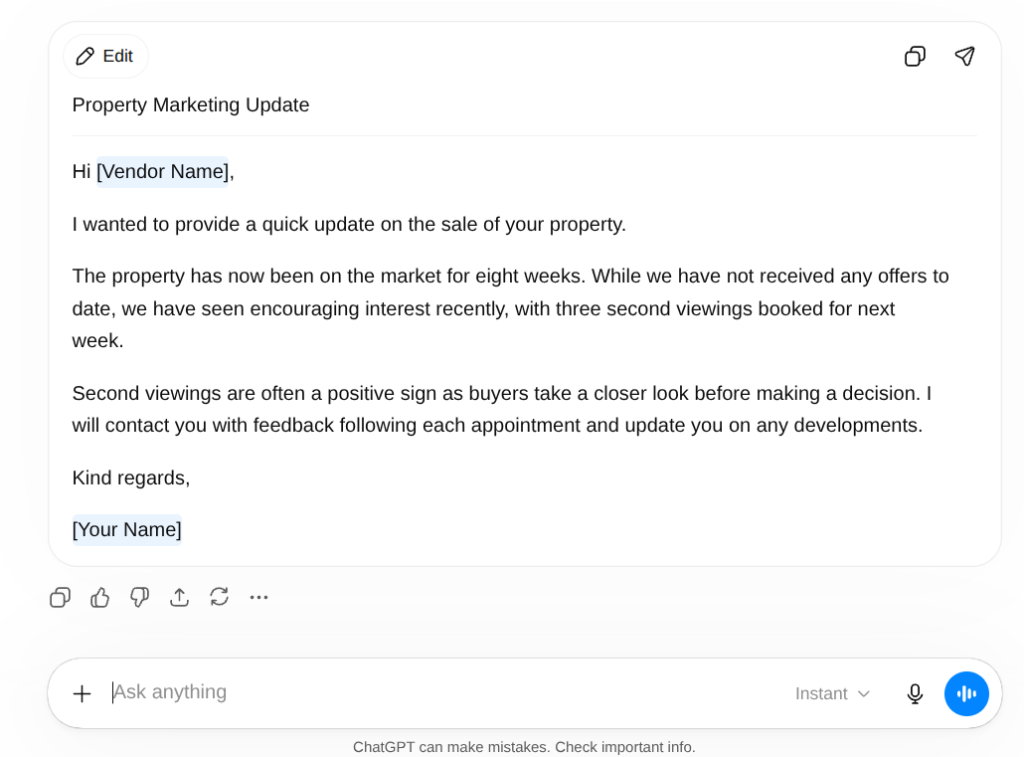
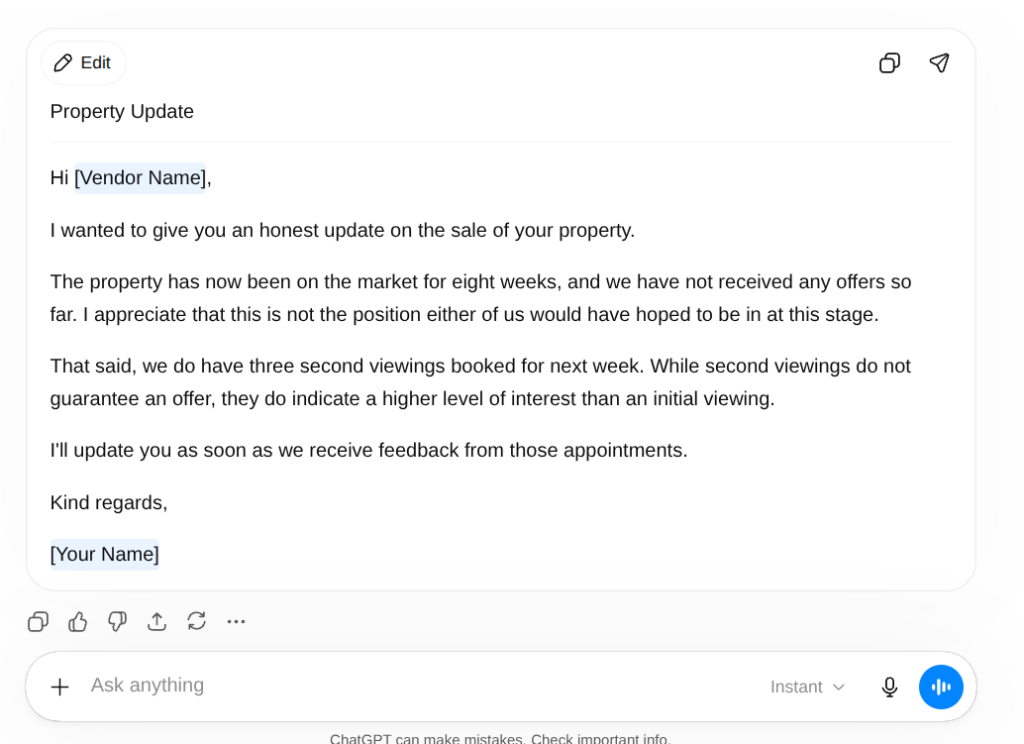
Same information. Same task. There may only be a slight difference, but that slight difference makes it more human and understanding.
Add tone to your business introduction
In Post 2 you built a business introduction prompt with a tone description in it. That covers your general register. Task-specific tone instructions override it where needed. Both sit in the same prompt. The task-specific one wins.
The Format Instructions Worth Knowing
Format is the part most people forget entirely. They specify the task, add context, assign a role, describe the tone, and then let AI decide how long the output is and what it looks like.
AI left to decide format produces something too long, structured in a way you would not choose, often with bullet points you did not ask for and a sign-off that sounds like a customer service script.
Length. “Under 100 words.” “No more than three sentences.” “Two short paragraphs.” A specific word count changes the output more reliably than any other format instruction. Without one, AI writes however long it wants.
Structure. “No bullet points.” “Single paragraph.” “Short paragraphs with one idea each.” “Numbered steps.” Tell AI exactly how the output should be laid out. If your agency sends short paragraph emails, say so. AI does not know your house style.
Opening. “Do not start with I hope this email finds you well.” “Start with the key information.” “Open with their name and go straight to the point.” The default AI opening line is the most recognisable sign that something was machine-written. One instruction removes it permanently.
Sign-off. “End with one clear next step.” “Sign off with first name only.” “Do not include a formal sign-off.” AI defaults to “Please do not hesitate to contact me should you have any further queries.” Nobody has ever said that out loud.
Negative Constraints Are the Most Underused Tool in Prompting
Posts 1, 2, and 3 in this series have all mentioned constraints briefly. This is the post where they deserve a full section.
Telling AI what not to do is often more effective than telling it what to do.
The reason is specificity. “Write in a warm tone” gives AI a direction. “Do not use the words pleased, delighted, or I wanted to reach out” gives it a precise boundary. Both improve the output. The constraint does it more reliably.
The constraints that do the most work in UK property communications:
Removing corporate language. “Do not use the words pleased, delighted, touch base, going forward, or should you have any queries.”
Removing padding. “Do not include pleasantries. Do not start with a sentence about hoping they are well. Start with the information.”
Removing liability risk. “Do not state specific completion dates.” “Do not include language that reads as a guarantee.” “Do not reference specific interest rates or products unless they are provided in this prompt.”
Removing the AI tell. “Do not use the phrase I hope this finds you well. Do not use I wanted to reach out. Do not end with please feel free to contact me.”
“Write a post-valuation follow-up email to a vendor.”
“Write a post-valuation follow-up email to a vendor. Do not use the words pleased or delighted. Do not start with a pleasantry. Do not end with please do not hesitate to get in touch. Under 100 words.”
Three constraints, thirty extra words in the prompt, five minutes less editing. The after version produces an email that sounds like a person wrote it.

Building Your Tone and Format Block
In Post 2 you built a business introduction. In Post 3 you built a role prompt. This post adds the third piece: a tone and format block.
Together, these three blocks cover everything AI needs before it writes a single word. Your business introduction covers who you are. Your role prompt covers who you are for this specific task. Your tone and format block covers exactly how the output should sound and look.
“Tone: [description]. Format: [structure]. Length: [word count or paragraph count]. Do not: [list two or three specific things to leave out].”
“Tone: professional but warm, plain British English, no corporate language. Format: short paragraphs, no bullet points. Length: under 120 words. Do not use the words pleased, delighted, or touch base. Do not start with a pleasantry. Do not end with please do not hesitate to contact me.”
“Tone: reassuring and informative, plain English, no jargon. Format: short paragraphs, no bullet points. Length: under 100 words unless the explanation requires more. Do not include specific product recommendations or interest rates unless provided in the prompt. Do not state timelines as guarantees. Do not use the phrase I hope this finds you well.”
Save both. Add them to the same document as your business introduction and role prompts. The full set takes thirty seconds to paste. The difference shows up on the first draft.
If you want to see how the full prompt set fits together before building your own, the Prompt Machine builds the structure for you. Pick your task, answer three questions, and it produces a prompt with tone and format already included. Free, no sign-up.
Before and After: Three Property Roles
Estate Agent: Post-Valuation Follow-Up
“Write a post-valuation follow-up email.”
“Act as an experienced UK estate agent. Write a post-valuation follow-up email to a vendor whose property we valued yesterday at £325,000. We recommended a realistic asking price of £315,000. The vendor seemed open but non-committal. Tone: confident, not pushy. Format: three short paragraphs. Length: under 120 words. Do not make promises about timelines. Do not use the words pleased or delighted. Sign off with first name only.”
Letting Agent: Check-Out Instructions
“Write a check-out instructions email to a tenant.”
“Act as a UK letting agent. Write a check-out instructions email to a tenant whose tenancy ends in three weeks. Tone: professional and clear. Format: short introductory paragraph followed by numbered steps. Length: under 150 words. Do not use threatening language. Do not reference deposit deductions in this email. End with a clear instruction about returning keys.”
Mortgage Broker: Rate Expiry Reminder
“Write a rate expiry reminder to a client.”
“Act as an FCA-regulated UK mortgage broker. Write a rate expiry reminder to a client whose fixed rate ends in three months. Tone: informative and prompt without creating alarm. Format: two short paragraphs. Length: under 100 words. Do not state specific rates or products. Do not imply a recommendation. End with a clear call to action to book a review call. Do not use I hope this finds you well.”
When to Override Your Own Format Rules
The tone and format block you build for client emails is not the right block for everything.
A market appraisal report commentary needs more than 120 words. A suitability letter introduction needs a formal register even if your day-to-day emails do not. A social media caption needs a completely different structure to a vendor update.
The block is a default, not a rule. Know when the task calls for something different and override the specific instructions that do not fit. Keep the ones that still apply.
The point of the block is not to constrain every prompt to the same output. The point is to remove the time spent making the same format decisions repeatedly for tasks you do every week.
Tone instructions do not replace compliance checks
In regulated communications, tone instructions control how something is written, not whether it is appropriate to send. A well-toned email that contains incorrect information or inadvertent regulated advice is still a problem. Format and tone first. Human review before it leaves your inbox. The guide to why AI gets things wrong covers exactly what to watch for.
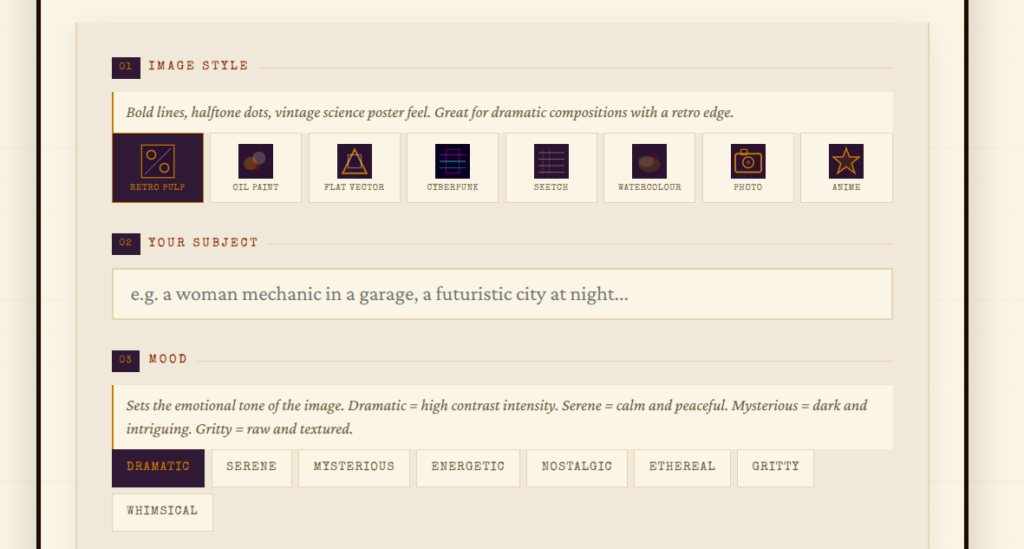
Tone and format for property images works the same way
Style, mood, and format instructions change what AI produces for images just as much as they do for written output. The Image Specialist builds the right prompt for property images. Tell it the style and mood you need and it gives you a prompt ready to use. Free, no sign-up needed.
One Post Left and It Is the One You Will Use Most
You now have a complete prompting method.
Specificity from Post 1. Context from Post 2. Role from Post 3. Tone and format from this post.
Every element works on its own. Together they produce output that takes less editing, sounds more like you, and does not arrive in someone’s inbox announcing itself as machine-written.
Post 5 covers the part most people skip. Even with everything above in place, the first draft is not always right. Post 5 covers the follow-up prompts that fix it. Not by starting again. By pushing back precisely on the parts that missed. Most people who try it do not go back to editing bad first drafts.
Want to Put These Prompts Inside an Automation?
Once your prompts produce consistent results, the next step is removing the manual task entirely. The Make Master finds the right Make.com automation scenario for your business in under a minute. Free, no sign-up needed.
Try the Make Master →Questions People Actually Ask
Add a tone instruction to every prompt. Plain English, professional but warm, no corporate language takes ten seconds and changes the output significantly. Pair it with a constraint: do not use the words pleased, delighted, or touch base.
Give it a specific word count. Under 100 words is more reliable than keep it brief. AI interprets brief differently every time. A number is unambiguous.
Short paragraphs, no bullet points, under 120 words, no pleasantry opening, sign off with first name. Those five instructions cover most of what makes an AI-written property email feel wrong without them.
Instructions telling AI what to leave out. Do not use the word pleased. Do not start with a pleasantry. Do not state specific timelines. Often more effective than positive instructions for controlling tone and removing AI tells.
Yes. Your general tone block covers most tasks. For specific situations, add or override individual instructions. A rent arrears chaser needs different tone instructions to a post-completion thank you.
Yes, and it works well. Do not use the words pleased, delighted, or touch base produces noticeably different output. List the specific words rather than describing a category.
How Telling AI to Play a Role Gets You Far Better Results
Tone and format instructions work best when they sit alongside a role. Post 3 covers role prompting and the exact role prompts for UK estate agents, letting agents, mortgage brokers, and property managers.
Read Part 3 →How to Refine AI Output Until It Is Actually Good
Even with everything from Posts 1 to 4 in place, the first draft is not always right. Post 5 covers the follow-up prompts that turn a near-miss into something worth sending.
Read Part 5 →