
- ◆What AI role prompting is and why five extra words change the output more than almost any other technique.
- ◆A full prompt broken down piece by piece so the logic is clear, not just the result.
- ◆Before and after: the same arrears chaser email with and without a role, so you can see the difference directly.
- ◆Ready-to-use role prompts for four property roles: estate agent, letting agent, mortgage broker, and property manager.
- ◆The difference between a role and a persona, and when each one is worth using.
- ◆When not to use a role prompt, and how this technique fits with specificity and context from Posts 1 and 2.

Post 2 in this series covered giving AI context about your situation. This post covers the layer that sits on top of that.
There is a difference between asking AI to write a client update email and asking AI to write a client update email as an experienced UK estate agent who writes in plain English, never over-promises, and treats every sentence as information rather than filler.
The second version is five extra words of setup. The output is noticeably different.
That is AI role prompting. You assign AI a specific identity before asking it to do anything. Not a vague one. A precise one. The more specific the role, the narrower the range of possible responses, and the closer the output gets to what you needed.
What Role Prompting Is and Why It Works
When you give AI a role, you are not tricking it or activating a hidden mode. You are giving it a tighter brief.
Without a role, AI produces the most statistically likely response to your task. That response draws from everything it has ever been trained on. Legal correspondence, American business writing, corporate memos, blog posts, instruction manuals. All of it in the mix.
A role instruction changes that weighting. “Act as a UK letting agent who communicates directly with tenants in plain English” tells AI to draw from a much narrower range of reference points. The output is noticeably different.
Most people who try it once keep using it.
Why the role needs to be specific
A vague role produces vague output. “Act as a professional” tells AI almost nothing. Every type of writing it has ever processed was written by someone professional. Specificity is what narrows the output. The more precisely you describe the role, the less guesswork AI has to do.
A Role Prompt Broken Down
The basic structure is: “Act as a [specific role]. [Task]. [Context]. [Constraints].”
The role comes first. Everything else follows.
Here is a full prompt pulled apart so the logic is clear. The task: a mortgage broker needs to reply to a first-time buyer who has asked why their application is taking longer than expected.
“Act as a reassuring UK mortgage broker with experience working with first-time buyers. Write a brief email to a client explaining that their application is progressing normally but the lender’s valuation has not yet been booked. This is standard at this stage. The client is anxious and has not bought before. Tone: calm, informative, no jargon. Do not speculate on timelines beyond what is confirmed. Do not mention other lenders or products. Under 100 words.”
Why each part is in there:
“Act as a reassuring UK mortgage broker with experience working with first-time buyers.” The role. It tells AI to draw on the communication style of a specific type of professional in a specific context. The word reassuring is doing real work here. It sets the emotional register before anything else is written.
“Write a brief email to a client explaining that their application is progressing normally but the lender’s valuation has not yet been booked.” The task and the situation combined. Clear, specific, one thing only.
“The client is anxious and has not bought before.” Reader context from the three-layer framework in Post 2. The role covers the broker’s communication style. This line covers who they are writing to.
“Do not speculate on timelines beyond what is confirmed. Do not mention other lenders or products.” Constraints. In a regulated environment these are not optional. They shape the output in ways that matter before the email reaches a client.
“Under 100 words.” Format. Without it, AI writes as long as it wants. Usually too long.
The role is the part most people skip. It is also the part that changes the output most.
Before and After: The Same Email, Two Ways
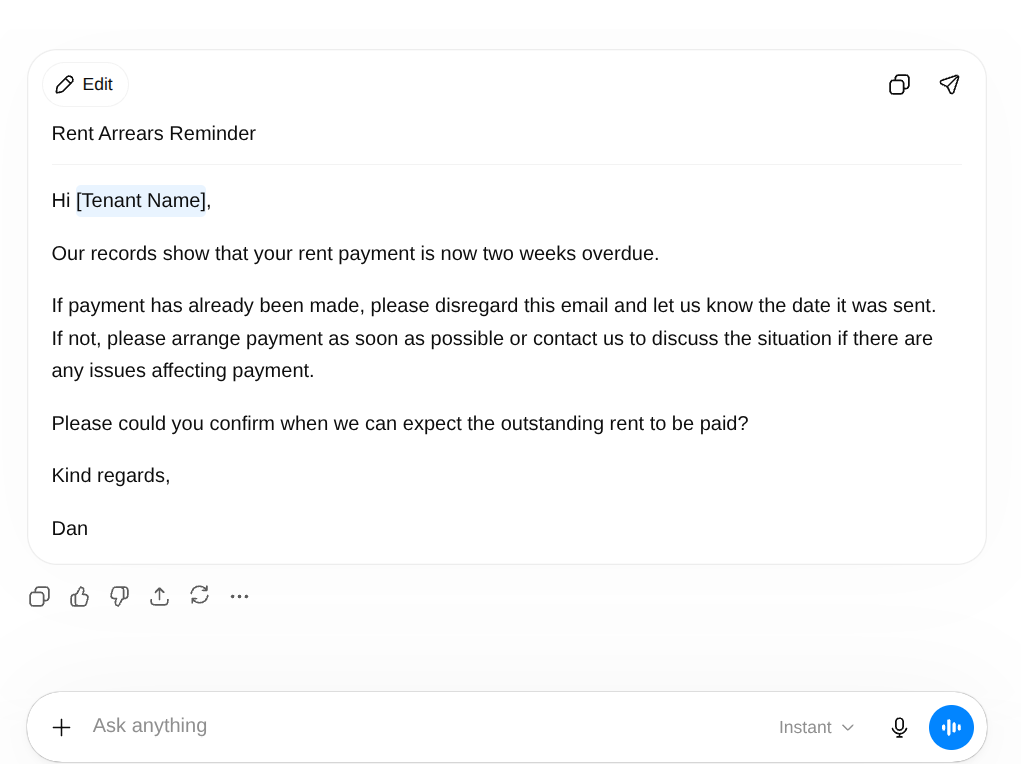
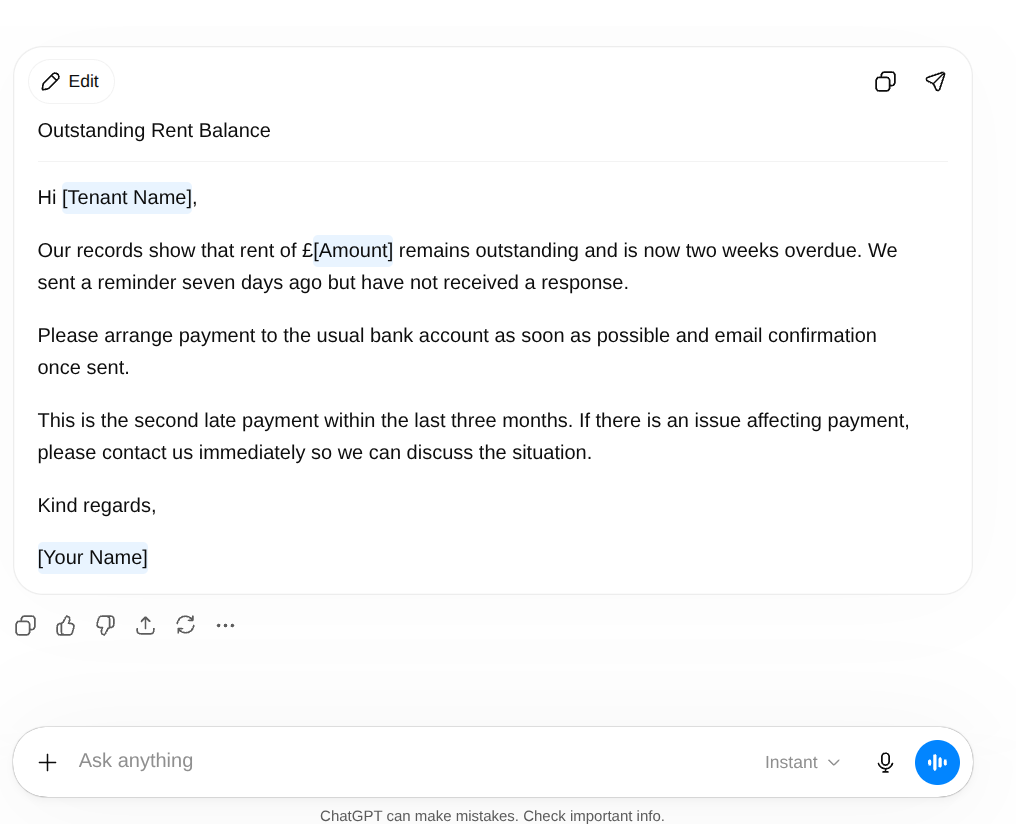
Same task both times. The first prompt has no role. The second has a precise one.
“Write an arrears chaser email to a tenant who is two weeks late on rent.”
“Act as a UK letting agent who handles arrears professionally and firmly without using threatening language. Write an arrears chaser email to a tenant who is two weeks late on their monthly rent payment. This is the second late payment in three months. A reminder was sent seven days ago with no response. Tone: firm, direct, fair. Include the amount outstanding and clear payment instructions. Tell them to contact us if there is a problem we should know about. Do not reference legal proceedings. Under 100 words.”
The before version produces a template you would edit heavily before sending. The after version produces something a property manager would actually send.
Role Prompts for Four Property Roles
These are working prompts. Paste them as the opening line of any prompt for the tasks listed. Adjust the specifics to match your business.
Estate Agent
“Act as an experienced UK estate agent who has worked in residential sales for over ten years. You write vendor and buyer communications in a warm, professional tone. You never use empty reassurance and never over-promise on timelines or outcomes. Every sentence contains information. You write in plain British English with no corporate language.”
Use this for: vendor updates, post-valuation follow-ups, buyer feedback emails, offer negotiation correspondence. The sales progression email guide has five ready-to-use prompts that work well with this role. For property descriptions, the property descriptions guide covers exactly what context to add alongside it. For portal replies, see the Rightmove and Zoopla enquiry guide.
Letting Agent
“Act as a UK letting agent registered with a professional body who manages residential properties for private landlords. You communicate with tenants in plain English, maintain a professional but approachable tone, and handle sensitive situations including arrears and maintenance with firmness and fairness. You never use threatening language and always include a clear next step.”
Use this for: rent reminders, arrears chasers, maintenance updates, tenancy renewals, check-out instructions.
Mortgage Broker
“Act as an FCA-regulated UK mortgage broker with experience advising first-time buyers, home movers, and landlords. You write in plain English with a reassuring and informative tone. You never include specific product recommendations or interest rates unless they are provided in the prompt. You do not offer regulated advice in written communications and always include a recommendation to speak directly before making any decisions.”
Use this for: case update emails, pre-application explainers, rate expiry reminders, renewal outreach, document request emails.
Save your role prompt alongside your business introduction
If you built a business introduction block in Post 2, save your role prompt in the same document. One covers who your business is. The other covers who you are in the specific context of the task. Paste both at the start of any prompt that needs consistent professional output.
Property Manager
“Act as a UK property manager who handles day-to-day communication between landlords and tenants on behalf of a residential lettings agency. You write factual, professional updates in plain English. You do not speculate on timelines you cannot confirm. You keep landlord updates short and information-dense. You keep tenant communications clear and direct without being abrupt.”
Use this for: maintenance progress updates, contractor booking confirmations, landlord inspection reports, tenant check-in correspondence.
Build a role prompt in sixty seconds
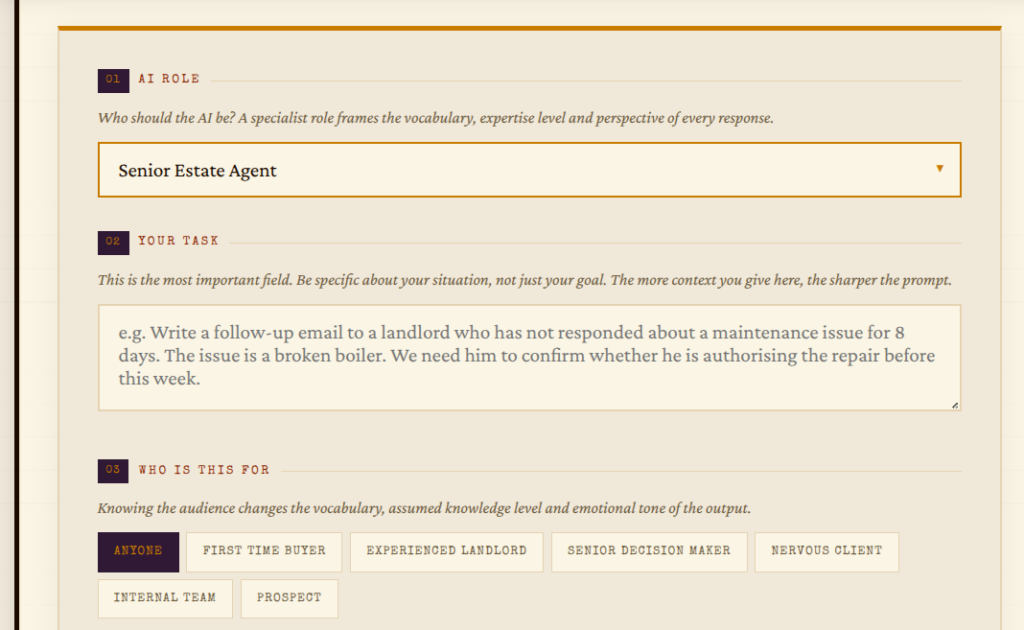
If writing a role prompt from scratch feels like more effort than it should, the Prompt Machine handles the structure. Pick your task, answer three questions about your situation and your role, and it builds the prompt for you. Free, no sign-up needed.
The Difference Between a Role and a Persona
A role tells AI what type of person it is. A persona goes further and tells it how that specific person communicates.
“Act as a UK estate agent.”
“Act as a UK estate agent who has worked in the same town for fifteen years, knows most of their vendors personally, writes short direct emails, never uses the word pleased, and signs off with their first name only.”
Both are useful. The persona version produces more consistent output for tasks you repeat regularly because there is less room for AI to fill in the gaps. If you send a lot of similar emails, building a persona once and saving it is worth the ten minutes.
The difference matters most in client-facing writing where tone consistency is important. Internal notes, summaries, and research queries do not need a persona. A precise role is enough.

Three Techniques, Working Together
You now have three things from this series that work together.
Specificity from Post 1 stops AI producing the generic version of what you asked for. Context from Post 2 gives AI the situation, the reader, and the tone it needs before writing anything. Role from this post narrows the professional register so the output sounds like it came from someone who does your job, not someone who has read about it.
Post 4 covers the part most people skip: tone and format. How to stop getting three paragraphs of corporate padding when you asked for a short plain email. How to tell AI exactly what the output should look like before it writes a single word.
Post 5 covers what to do when the output still is not right after all of that. It happens. The follow-up prompts in Post 5 are what separate people who find AI useful from people who give up after the first draft.
When Not to Use a Role Prompt
Role prompting is not the right tool for everything.
A thank you message to a long-term client who has just completed on their home should sound like you, not “an experienced estate agent.” Personal moments need your voice, not an archetype’s.
Internal notes, quick summaries, and research queries do not benefit from a role. They benefit from a clear task and good context. Adding a role to a prompt asking AI to summarise three bullet points is unnecessary setup for a thirty-second job.
Use a role when the output needs to sound like a specific type of professional. Skip it when the output needs to sound like you specifically, or when the task is simple enough that the setup takes longer than the writing.

Want the Right Tools Set Up and Running for Your Business?
Better prompts save time on individual tasks. Automation removes the task entirely. If you want to see what that looks like for your property business, the Discovery Audit is where it starts. One session, a full report, and a clear picture of what is worth building first.
Book a Discovery Audit →Questions People Actually Ask
Telling AI to respond as a specific type of person before asking it to do anything. It narrows the range of possible responses and produces output that matches a professional standard rather than a generic one.
Yes. Assigning a specific, detailed role changes the tone, language, and structure of what AI produces. A vague role makes little difference. A precise one makes a significant one.
The ready-to-use estate agent role prompt is in this post under Role Prompts for Four Property Roles. It covers experience, tone, communication style, and constraints. Copy it, adjust the specifics, and paste it at the start of any prompt for vendor or buyer communications.
A role describes the type of professional. A persona describes how that specific professional communicates. Personas produce more consistent output for repeated tasks where tone consistency matters.
No. Use a role when the output needs to sound like a specific type of professional. Skip it for simple tasks, internal notes, or anything where your personal voice matters more than a professional archetype.
Yes, and it is worth doing. Your business introduction covers your company and general tone. Your role prompt covers the specific professional context of the task. Together they give AI more to work with than either one alone.
How to Give AI the Context It Needs to Help You Properly
Role prompting works best when it sits on top of good context. Post 2 covers the three context layers and the reusable business introduction that makes every prompt better.
Read Part 2 →How to Control the Tone and Format of Every AI Response
You know what to ask, how to give context, and how to assign a role. Post 4 covers the last thing AI needs before it writes: exactly how the output should sound and what it should look like.
Read Part 4 →