
- ◆ChatGPT, Claude, and Gemini all generate text from prompts. They are not equally good at the same jobs.
- ◆Picking the right one for each task saves time. Picking the wrong one just means more editing.
- ◆This guide tells you which tool fits which property task and which one to start with.

A letting agent in Leeds uses ChatGPT for everything. Gets decent results on emails, finds property descriptions a bit generic, keeps editing them. Her colleague switched to Claude for descriptions. Spends about half the time on edits. Still uses ChatGPT for everything else.
Neither of them changed tools based on a spec sheet. They tried something different for one task and it saved time.
That is the point. Which tool, for which property job.
What You Will Learn
– What makes each tool different in plain English
– A task-based comparison table for quick reference
– Which tool works best for estate agents, letting agents, and mortgage brokers
– A simple decision guide for choosing where to start
– A fourth tool worth knowing about for research tasks
Four Tools, Four Different Jobs
Four tools. Four different jobs.
ChatGPT is your general drafting tool. Fast, broad, handles most everyday tasks without much friction. Good starting point if you want one tool that covers most things.
Claude is where you go when the writing actually matters. Longer documents. Suitability letters. Property descriptions that need to sound like a person wrote them. It follows detailed instructions more precisely and holds tone across a whole document better than anything else here.
Gemini is your Google workflow tool. It lives inside Gmail and Google Docs. If you are already in that ecosystem, you draft without switching tabs.
Perplexity is your research tool. Searches the web in real time and shows you the sources. Use it when you need current information rather than generated text. More on this below.
If you are new to all of this, the plain English guide to what AI actually is is the right place to start before this one.
Why they feel different
All four tools are built on similar principles. The differences come from what they were trained on and what they were optimised to do well. The same way a screwdriver and a drill both turn screws but one is clearly better for certain jobs. See the Jargon Buster for plain English definitions of any terms that come up.

Task-Based Comparison
| Task | Best tool | Why |
|---|---|---|
| Portal lead replies | ChatGPT or Claude | Both work well. ChatGPT is faster to iterate. Claude produces slightly more polished tone. |
| Vendor and buyer update emails | ChatGPT | Fast, reliable, handles repetitive structured emails well. Build your prompt once and reuse it. |
| Property descriptions | Claude | More consistent tone across the whole description. Less generic on first draft. Less editing needed. |
| Suitability letters | Claude | Stronger at following multi-point instructions across a longer document without drifting in tone or missing a point. |
| Tenancy correspondence | ChatGPT or Claude | Both handle arrears chasers, maintenance updates, and renewal notices well with a clear prompt. |
| Fact-find and case summaries | Claude | Better at structured summarisation of complex information into a consistent format. |
| Current legislation or rates | Perplexity | The only tool here that checks current information with cited sources. ChatGPT and Claude draw on training data that may be out of date. |
| Tasks inside Gmail or Google Docs | Gemini | Integrates directly into Google Workspace. No tab switching. Practical if your workflow is already Google-based. |
| Brainstorming and ideation | ChatGPT | Fast, creative, good at generating options quickly. Better starting point when you want range rather than polish. |
Which AI Tool Is Best for Estate Agents, Letting Agents and Mortgage Brokers
Estate Agents
Portal leads, vendor updates, buyer chasers. Volume work. ChatGPT handles all of it. Build a prompt template for each as covered in Part 3, save it, reuse it.
For property descriptions, try Claude. The first draft is noticeably less generic. There is a full guide to AI property descriptions if you want to see exactly how that works in practice. Across thirty instructions a month, that is a lot of editing time back.
Letting Agents
Arrears chasers, maintenance updates, renewal notices, landlord progress emails. Either ChatGPT or Claude. Both work well here with a clear prompt.
If your office runs on Google Workspace, Gemini is worth trying. It sits inside Gmail so you draft without leaving your inbox.
For anything touching current legislation, check it in Perplexity first. Then write the communication in ChatGPT or Claude.
Mortgage Brokers
Claude. More clearly than for any other audience here.
Suitability letter introductions, client explanation emails, fact-find summaries. All of them are tasks where the writing needs to be precise and professional across something longer than a few lines. Claude handles that better. Most brokers notice on first comparison.
For regulatory research, Perplexity. It checks. The others guess from memory.
Always review compliance output before it goes to a client. Part 2 covers why.
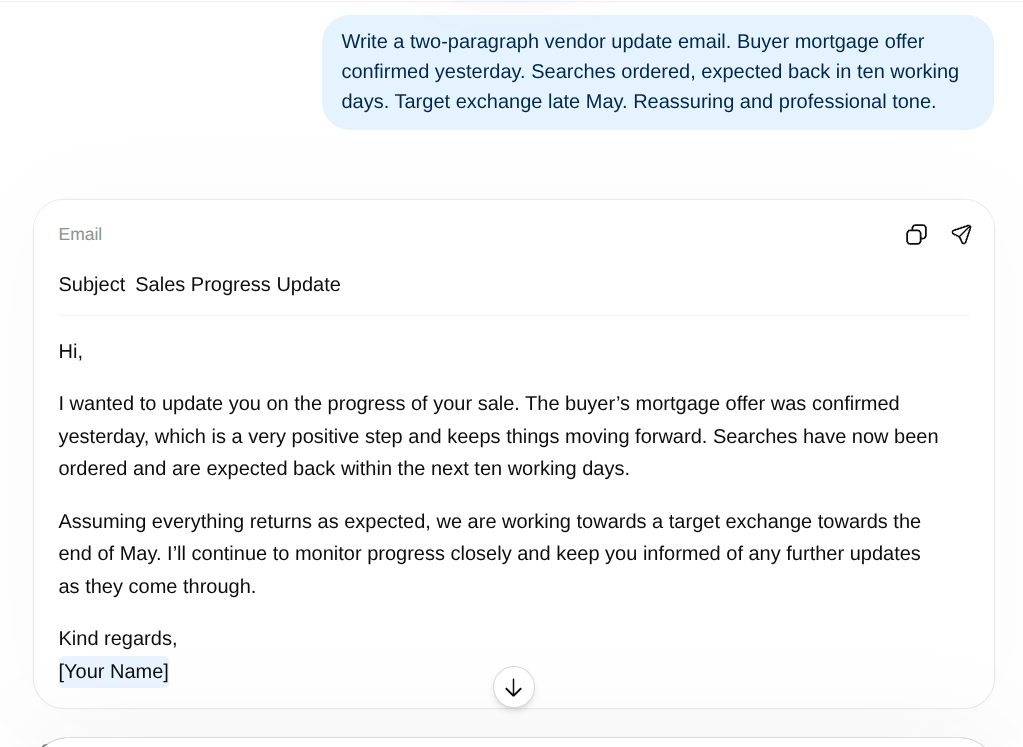
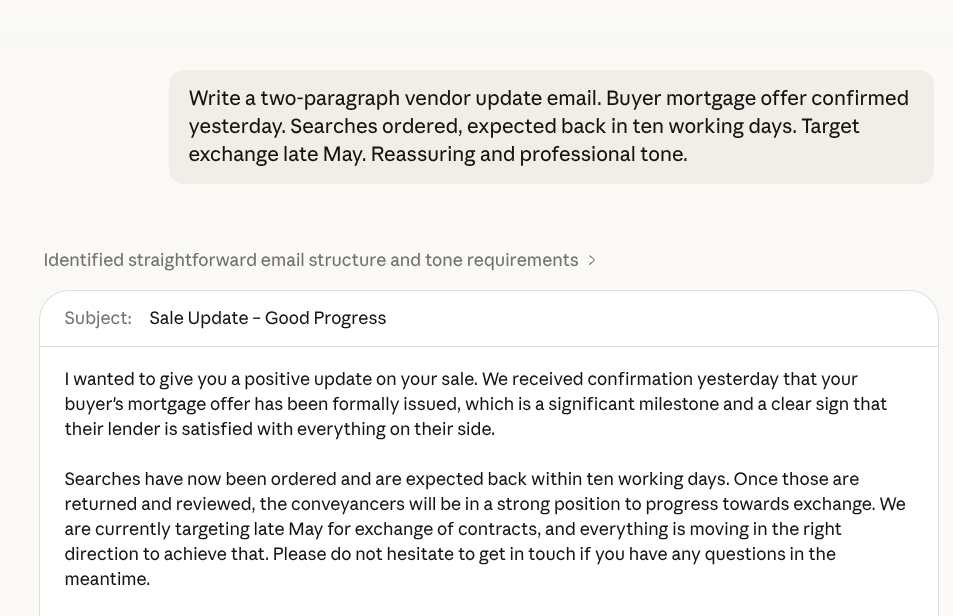
Same prompt. Two tools. Decide which output needs less editing.
The Research Tool: Perplexity
Perplexity does something the other three do not. It searches the web in real time and shows you the sources it used.
ChatGPT and Claude generate text from training data. That training has a cut-off date. Ask about current mortgage rates, recent changes to tenancy legislation, or the latest EPC guidance and you may get a confident answer that is out of date. Part 2 covers this in detail.
Perplexity goes and checks. Shows you the source. You can verify it yourself in one click.
Use it for research. Use ChatGPT or Claude for the writing. They are doing different things.

Which One Should You Start With
Pick the situation that matches yours.
Start here
- I want one tool for most things – ChatGPT. Broad, fast, well supported.
- Tone and quality matter more than speed – Claude. Suitability letters, property descriptions, detailed client comms.
- I live in Gmail and Google Docs – Gemini. Drafts without switching tabs.
- I need current information, not generated text – Perplexity for research, then ChatGPT or Claude to write.
- I already use one tool and wonder if another is better – Run the same prompt in both. See which needs less editing.
Try one. See if it saves time. Adjust.
The Mistake Most People Make
Using one tool for everything without trying another for the tasks where it feels slightly off.
If property descriptions from ChatGPT feel a bit generic, five minutes in Claude might fix that permanently. Saves editing time across thirty descriptions a month. Worth knowing.
Most people who get real value from AI use two tools. One for the quick stuff. One for when it actually has to be good.
10 AI Prompts Every Property Professional Should Steal
Ten copy-paste prompts built for estate agents, letting agents, mortgage brokers and tradespeople. No AI experience needed. No faff.
Get the Free Prompts → Only Email Signup NeededTry This Before the End of the Week
Pick one task you already use AI for. Portal lead, vendor update, property description.
Run the same prompt in a different tool to the one you normally use.
Which one needs less editing? That is your answer for that task. Ten minutes. Genuinely useful.
Questions People Actually Ask
ChatGPT is faster and handles a broader range of tasks. Claude is stronger at longer writing and maintaining a consistent professional tone. For most property tasks either works. For suitability letters and detailed client communications, try Claude first.
ChatGPT for portal leads, update emails, and general volume work. Claude for property descriptions and anything where the writing quality needs to be right on first draft. Run the same prompt in both once and see which needs less editing.
Claude for suitability letters, client emails, and case summaries. Perplexity for current regulatory information. Always review compliance output before it goes to a client or a file.
ChatGPT or Claude for tenant correspondence and landlord updates. Gemini if your workflow is already in Google Workspace. Perplexity before drafting anything where current legislation matters.
Yes, if you work primarily in Gmail and Google Docs. It integrates directly into those products so you draft without switching tabs. As a standalone writing tool it performs similarly to ChatGPT for most tasks.
Perplexity searches the web in real time and shows you the sources. ChatGPT and Claude generate from training data with a cut-off date. Use Perplexity for research, use ChatGPT or Claude for writing.
No. All four have free versions that cover most everyday property tasks. Start free. Pay when you are hitting limits regularly and the time saving justifies the cost.
Yes. Most people who get real value from AI end up using two. One for general drafting, one for the tasks where quality really matters. Add Perplexity when you need current information.
How to Build AI Into Your Working Day Without It Taking Over
You now know what AI is, why it gets things wrong, how to ask it better questions, and which tool to use for what. The final guide pulls it together into a working week. How to use AI consistently without it becoming another thing to manage.
Read Part 5 →