
- ◆Most small businesses are spending hours every week on five admin tasks that follow exactly the same steps every time.
- ◆This guide covers which ones to automate first, the free tool that connects most of it together, and how to pick where to start.
- ◆No technical knowledge needed. One working automation this week is realistic.

The follow-up email you meant to send yesterday. The invoice reminder you keep softening. The question you have answered seventeen times this month. The new client email you copy from last time and hope you remembered everything.
Same task. Same steps. Every time.
That is what automation is built for. And these five tasks are the right place to start.
If you are new to AI and automation, this guide on building AI into your working day is a good place to start before diving into the individual tasks.
What You Will Learn
– Why these five tasks are the right starting point
– What the automated version of each one looks like
– The free tool that connects most of it
– How to decide which one to fix first

The Five Admin Tasks Worth Automating First
According to McKinsey, employees spend an average of 28% of their working week on email and routine communication tasks. For a small business owner doing everything themselves, the proportion tends to be higher.
None of the five tasks below require technical knowledge to automate. All five follow exactly the same steps every time, which is exactly why they are the right place to start.
1. Lead Follow-Up
Someone fills in your enquiry form at 6pm Thursday. You see it Friday morning. They have already heard back from someone else.
Harvard Business Review research suggests businesses responding to leads within the first hour are significantly more likely to have a meaningful conversation than those who wait. The window is shorter than most people assume.
The automated version sends an acknowledgement the moment the form is submitted. A follow-up the next day. A second message a few days later if there has been no reply. You write those messages once. The sequence runs every time without you touching it.
Full guide: Your Leads Are Not Going Cold. You’re Just Not Following Up Fast Enough.
2. Invoice Chasing
The invoice has been sitting there for eleven days. You know you need to chase it. You also know you will spend twenty minutes softening a message that should take two.
Automating it removes the decision entirely. A sequence goes out on a schedule you set: friendly first reminder, firmer second, factual final. It stops when payment lands. You never have to decide whether it is too soon to follow up again.
The less obvious benefit: when chasing is automated, invoices tend to go out on time with clearer payment terms. Because you are not already dreading what comes next.
Full guide: Getting Paid Shouldn’t Be This Uncomfortable
3. Repeat Customer Questions
“What time is my appointment?” “What do I need to bring?” “Have you received my form?”
You know these are coming. You answer them anyway, every week, because there is nothing stopping clients from needing to ask.
A confirmation email after booking that covers the top five things people always ask removes most of it. The client already has the answer before they think to ask the question.
Full guide: Your Clients Are Asking the Same Questions Every Week. Here’s How to Stop Answering Them.
4. Client Onboarding Admin
Someone says yes. Now what?
For most small businesses the honest answer is: it depends what day it is. Contract usually. Welcome email probably. Information form if you remembered. Done from memory, in a slightly different order each time, and something occasionally gets missed.
A triggered sequence runs the same steps every time from the moment a client confirms. Contract, deposit, information form, welcome message, booking link. Same order. Whether it is a busy Tuesday or a quiet Friday afternoon.
Full guide: What Happens After Someone Says Yes? (Most Businesses Wing It)
5. Appointment Confirmations and Reminders
A no-show costs the time and the slot. A confirmation when someone books and a reminder the day before reduces them. Most booking tools have this built in already.
If yours does not, Make.com handles it. Under half an hour to set up. If nothing else on this list is live yet, start here.
The Tool That Connects Most of This
What is Make.com?
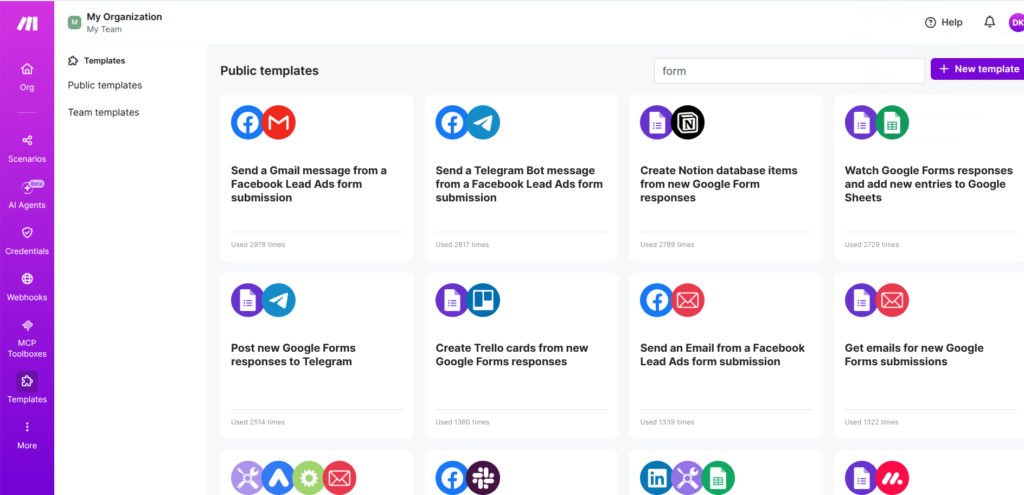
Make.com watches for a trigger. A form submitted, a payment received, a booking confirmed. When it fires, it does something in response. Sends an email. Updates a record. Notifies you. You build it visually by connecting blocks on a canvas. No code.
Make.com is free to start. The free plan gives you 1,000 operations a month, which tends to be enough for most small businesses getting started.
If you want to know what to build first, the Make Master does the picking for you. Free. About 60 seconds. Gives you the exact modules to use for your scenario.

Which One to Do First
Pick the one costing you the most right now. Not the easiest one. The one that made you wince when you read it.
| If this sounds like you | Start here | Rough setup time |
|---|---|---|
| Leads going quiet before you reply | Lead follow-up | 1–2 hours |
| Unpaid invoices you keep putting off chasing | Invoice chasing | 1–2 hours |
| Same questions in your inbox every week | Repeat questions | Under 1 hour |
| New clients getting a different experience every time | Onboarding | 2–3 hours |
| No-shows eating into your week | Appointment reminders | Under 30 minutes |
Pick one. Get it working. The second one is easier once the first is live.
Start with the one you dread
The right first automation is not the most interesting one. It is the task you keep putting off. The invoice reminder sitting in your drafts. The follow-up you meant to send three days ago. Start there. The payoff tends to be immediate because the task was already costing you something.
- Replying manually to every new enquiry
- Following up leads who have not responded
- Sending invoice reminders one at a time
- Answering the same client questions every week
- Sending contracts and welcome emails to new clients
- Booking confirmations and appointment reminders
More than two ticked means there is a reasonable amount of time to get back here.
The Rest of This Series Goes Deeper on Each One
Each post below covers one of these tasks in full, what to build, how to build it in Make.com, and what to do when it does not go quite right. If you would rather have someone build it for you, that is what the Discovery Audit is for.
Book a Discovery Audit →Questions People Actually Ask
Lead follow-up, invoice chasing, repeat customer questions, client onboarding, and appointment reminders. These follow exactly the same steps every time, which makes them the most straightforward to automate without technical knowledge.
Appointment reminders. Most booking tools include this already. If yours does not, Make.com handles it in under 30 minutes. Low effort, immediate result.
No. Make.com uses a visual canvas where you connect triggers and actions by clicking. The Make Master tool tells you exactly which modules to use so you are not starting from a blank canvas.
The free plan includes 1,000 operations a month. Paid plans start at around £9 a month. Most small businesses getting started do not hit the free plan limit for a while. Start free, upgrade when you need to.
Simple automations like appointment reminders take under 30 minutes the first time. More complex multi-step sequences take a few hours. Make.com has templates covering most common scenarios so you are not building from scratch.
Make.com tends to work better for most small businesses. The free plan goes further and it handles multi-step automations more flexibly. Zapier is slightly simpler for basic two-step builds but the free tier is more limited.
Not necessarily. Check what your existing booking tools, CRM, or email platform already does. Make.com becomes the right choice when you need to connect two separate apps or when your current tools do not support what you need.
The rest of the series
Each post below goes deeper on one of these five tasks. What to build, how to build it, and what to do when it does not go right first time.
Part 1: The 5 Admin Jobs That Are Quietly Eating Your Week — you are here
Part 2: Your Leads Are Not Going Cold. You’re Just Not Following Up Fast Enough.
Part 3: Getting Paid Shouldn’t Be This Uncomfortable
Part 4: Your Clients Are Asking the Same Questions Every Week. Here’s How to Stop Answering Them.
Part 5: What Happens After Someone Says Yes? (Most Businesses Wing It)
Read Part 2 →