
- ◆AI is not a new workflow. It is a helper inside the one you already have.
- ◆The people who get real value from it do not use it for everything. They use it consistently for the tasks where it earns its place.
- ◆This guide shows you how to find those tasks, build the habit, and keep it without it becoming another thing to manage.

Four posts in, you know what AI is, why it gets things wrong, how to write a prompt that works, and which tool to use for what.
This is the one that makes all of that useful.
AI is not the workflow. It is the helper inside the workflow. The people who get value from it are not the ones who overhauled how they work. They found three or four tasks where AI earns its place and kept doing those.
The habit is the win. Everything else follows.
What You Will Learn
– The one rule that makes AI stick as a habit
– What a working week with AI actually looks like
– Which tasks are worth it and which are not
– How to build a prompt library you actually reuse
– What to do when the output is not good enough
– A recap of everything covered in this series
The One Rule: One Task, One Week
Pick one specific task you do regularly. Use AI for that task only, for one week.
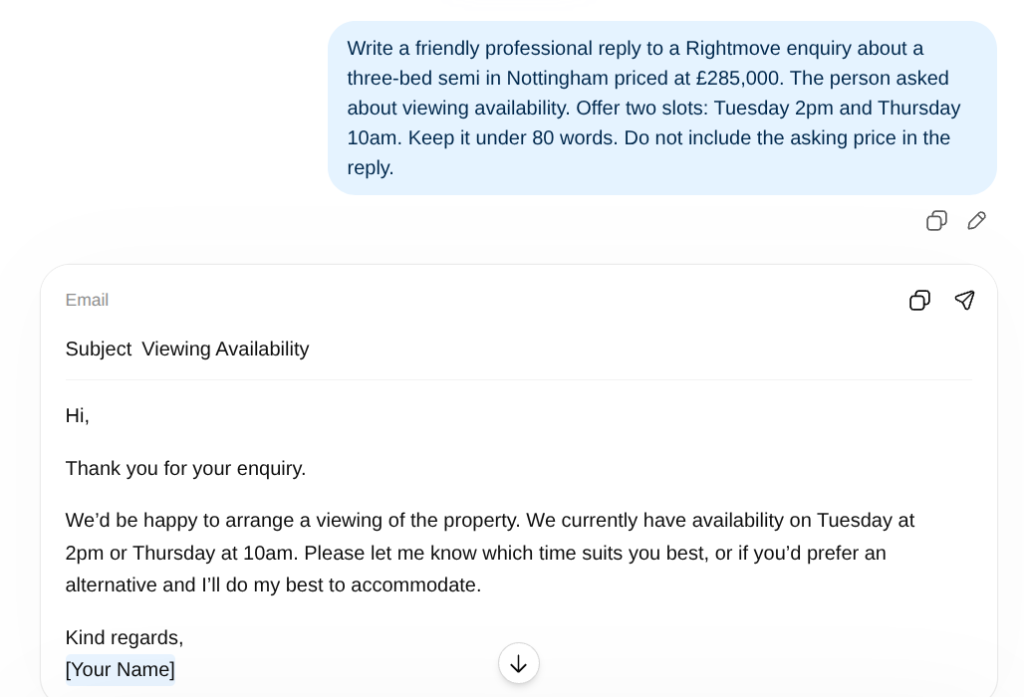
Not “I will use AI more this week.” Too vague. Pick something specific. Every portal lead reply this week goes through AI first. Every vendor update gets drafted in Claude. Every property description starts with a prompt instead of a blank screen.
One task. One week. See what it does to your time. If it saves time, keep doing it. You have one AI habit. Add a second when the first one is automatic.
That is it.
How to pick your first task
The right first task is something repetitive, low-stakes, and something you have written before. Portal lead replies, vendor updates, arrears chasers. Not compliance documents. Not regulated advice. The repetitive stuff is where AI earns its place fastest.
What a Working Week With AI Actually Looks Like
Not every task. Not constant tool switching. Specific moments where AI removes the part that took the most time.
Monday morning: portal lead backlog
Twelve new enquiries from the weekend. With a saved prompt template, you paste each enquiry in, read the draft, adjust the viewing slots, send. Done in twenty minutes instead of an hour. The repetition is gone.
Mid-week: sales progression updates
Five vendor update emails. Brief AI on the key milestones for each case. Five first drafts in about three minutes. Light edit on each. Done before you would have finished the first one the old way.
Property descriptions
You have the valuation notes. Give AI the brief using the five-part formula from Part 3. First draft in thirty seconds. Edit what is off. The blank page problem is gone.
Legislation or compliance questions
Do not ask ChatGPT or Claude. Open Perplexity. Sourced, current answer. Verify it independently if anything is riding on it. Part 2 covers exactly why the others get this wrong.
What Is Worth Automating and What Is Not
Not everything benefits from AI.
Worth it
- Any email you have written a version of before
- Property descriptions, especially at volume
- First drafts of structured documents
- Summarising long email chains into key points
- Explaining something complex in plain English for a client
- Answering the same client question you get every week
If you want a bigger list of admin tasks worth automating, this post covers the five that eat the most time across most small businesses.
Not worth it, or needs care
- Anything touching current legislation without checking it first
- Compliance documents without a qualified review
- Client communications where relationship history matters more than efficiency
- Regulated advice of any kind
- Any task with real client data in a free tool
The “worth it” list covers most of the daily writing that eats the most time. Worth knowing before you go looking for problems AI cannot solve.
Your Prompt Library: Save It Once, Use It Forever
The first time you write a prompt for a task, it takes a few minutes. You are thinking about the five-part formula from Part 3. You test it, adjust it, get a result you are happy with.
Save it. That is the prompt for that task from now on.
Next time, you paste the enquiry details in, change the property specifics, and send. The thinking happened once. After that you are just swapping the details.
| Task | What the saved prompt covers | Time to use |
|---|---|---|
| Portal lead reply | Tone, word count, viewing slot format, what not to include | Under 2 minutes |
| Vendor update email | Structure, reassuring tone, no guarantees constraint | Under 2 minutes |
| Property description | Word count, target buyer, tone, banned clichés | Under 3 minutes |
| Maintenance chaser | Firm but professional tone, word count, what not to threaten | Under 2 minutes |
| Suitability letter intro | FCA-compliant tone, no product recommendations constraint | Under 3 minutes |
If you want to take the next step beyond prompting and start automating repetitive tasks entirely, the Make Master is a free tool that finds your first Make.com automation in 60 seconds.
A folder on your desktop. A note on your phone. Somewhere the prompts live so you never write the same one twice.
When It Goes Wrong
It will. Here is what to do.
Output is off in tone or structure. Push back. “Make it shorter.” “The tone is too formal.” “Remove the last paragraph.” The second version is almost always better than the first.
Output contains something you cannot verify. Anything touching legislation, compliance, or financial figures needs an independent check before it goes anywhere. Not optional.
A whole session produces nothing useful. The problem is the prompt. Too vague, too much asked at once, task buried at the end. Go back to the formula. One task. Clear context. Start again.
Everything This Series Covered
Five posts. One method.
The AI Foundations Series – The Complete Method
- Part 1 — What AI actually is. Software that predicts useful text based on patterns. Not a brain. Not a search engine. A fast first-draft machine that needs a human checking what comes back.
- Part 2 — Why it gets things wrong. AI generates plausible text, not verified text. Knowing which output to check and how is a permanent habit, not a one-off.
- Part 3 — How to ask it better questions. Task, context, tone, format, constraints. Save the prompts that work. Reuse them. Never build from scratch twice.
- Part 4 — Which tool to use. ChatGPT for speed. Claude for quality. Gemini for Google Workspace. Perplexity for current information with sources.
- Part 5 — How to make it stick. One task, one week. Build the reflex. Save the prompts. Check the output. The habit is the win.
The Honest Summary
AI will not change everything about how you work.
It will save you real time on the repetitive writing that fills most of your day. Portal leads. Update emails. Property descriptions. First drafts of things you would otherwise stare at for ten minutes before starting.
That time goes back to the parts of the job that actually need you. The anxious client. The instruction you need to win in person. The local knowledge that no tool has. The judgement that comes from doing this for years.
AI handles the repetition. You handle the rest.

10 AI Prompts Every Property Professional Should Steal
Ten copy-paste prompts built for estate agents, letting agents, mortgage brokers and tradespeople. No AI experience needed. No faff.
Get the Free Prompts →Questions People Actually Ask
Pick one task you do regularly and use AI for that task only, for one week. A portal lead reply, a vendor update, a property description. See if it saves time. If it does, keep doing it. Add a second task when the first one is habit.
Most people notice within the first session if they pick the right task and write a clear prompt. The bigger gains come after a few weeks when you have saved prompts for your most common tasks and reach for them automatically.
Push back. “Make it shorter.” “The tone is too formal.” “Remove the last paragraph.” If the second version is still off, the problem is usually the prompt. Go back to the five-part formula from Part 3.
For drafting repetitive communications, yes. For anything touching legislation, compliance, financial figures, or regulated advice, verify the output independently before using it. Never paste real client data into a free tool without checking its privacy policy first.
Only if you send it unedited. A well-prompted, well-edited AI draft is indistinguishable from something you wrote yourself. The skill is in briefing it clearly and knowing what to fix.
Check the output before it goes anywhere. AI is fast and capable of getting things confidently wrong. Brief it well, read what comes back, send nothing without checking it. Everything else in this series builds from that.
Where to Go From Here
The Jargon Buster explains any AI term that came up in plain English. The Prompt Machine builds your prompts for you. And if you want to map out an automation idea before you build it, the Blueprint Drawer is the place to start.
Jargon Buster → Prompt Machine → Blueprint Drawer →